

DarkSarcasm
Participant
September 9, 2022
Question

Photoshop 2022 Won't Launch due to Scratch Disk Error

  • September 9, 2022
  • 2 replies
  • 507 views

App: Photoshop 2022

System: Lenovo Flex 14 laptop, Windows 10


I am not able to open Photoshop because the launch is interrupted by an error that tells me my scratch disk is full. 
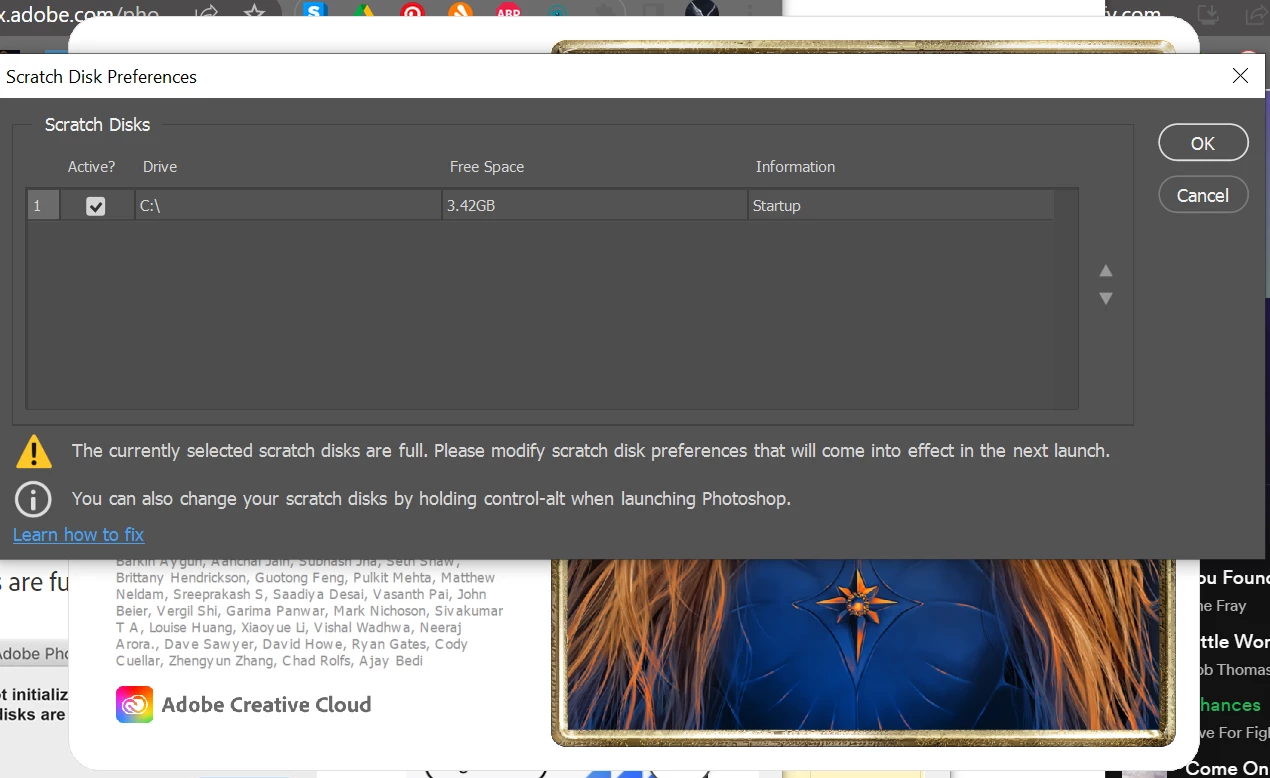
I clicked the 'learn how to fix' hyperlink and read the suggestions in this article: https://helpx.adobe.com/photoshop/kb/troubleshoot-scratch-disk-is-full.html?trackingid=88X75MY1&mv=in-product&mv2=ps#
But none of it worked. I tried Disk Cleaner. It doesn't give me other disks to choose from as seen in the screencap, I can't do anything in the preferences because this error is preventing PS from opening and using Control + Alt + Shift to reset the preferences did not work. 

I'm not savvy, I don't even know what the hell a scratch disk is. How do I fix this?

This topic has been closed for replies.

2 replies

War Unicorn
Community Expert
Community Expert
October 4, 2022

Is it true that laptop only has 4 GB of RAM? (It's expandable to 16 GB, if these specs I'm finding are true.) That's pretty low. Photoshop loves RAM, as much as you can muster; if it can't use any available RAM, it's going to use your scratch disk.


As far as storage goes, move anything non-essential off the drive. (This includes, music, photos, documents, etc.) Get a removeable drive or use a NAS (network-attached-storage) solution.

Ged_Traynor
Community Expert
Community Expert
September 10, 2022

Hi

You only have 3.42GB of free space on the C drive, forget about Photoshop for the moment because you're going to run into issues on an OS level with only 3.42GB of free space, you really need to free up space on the C drive.

https://www.pcmag.com/how-to/free-up-hard-disk-space-on-windows-10

Photoshop uses space on the allocated drive/drives for temporary storage and this is what the scratch disk is, generally you can get away with 20GB of free space but it's recommended to have 100GB or even more depending on the kind of documents you work on, 500GB would be even better.

Just opening Photoshop without even opening a document requires over 5GB of scratch disk space.

https://helpx.adobe.com/ie/photoshop/using/scratch-disks-preferences.html

DarkSarcasm
Participant
October 4, 2022

Again with that huh?
I've tried to free disk space, multiple times (CCleaner, Disk Cleaner, Deleting apps etc) but nothing I do makes much of a difference if any.