

kathydannelvitcak
Inspiring
August 16, 2023
Question

Photoshop 2023 Color Setting Suggestions Welcomed...Make That Desperately Seeking Solutions

  • August 16, 2023
  • 1 reply
  • 1637 views

For some utterly asinine reason I changed the color settings in Photoshop to what I hoped were the newest latest greatest thing since Hulu without commercials and now I am experiencing regret, major "I-got-drunk-at-the-county-fair-and-oh, never mind" regret.
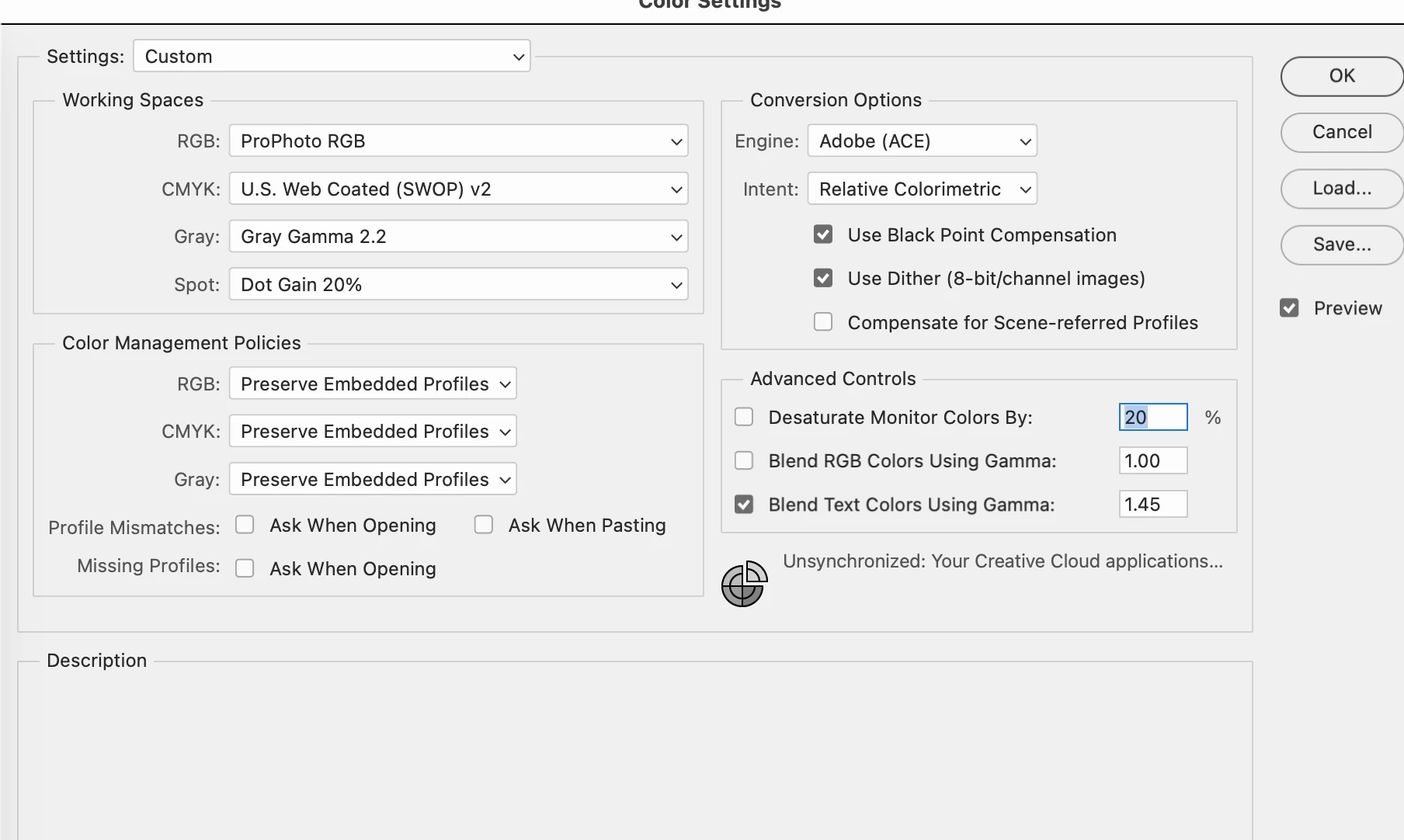
 

My system is Mac Studio 2022 Ventura 13.5 with Apple Studio Display Preset (P3-600 nits) Auto brightness is turned off, True Tone turned off. 


Color Settings in Photoshop attached, but also here...

RGB - ProPhotoRGB (this is what I changed to from Adobe RGB | CMYK US Web Coated (SWOP) 2 (not changed), Gray Gamma 2.2 & Dot Gain 20%

Color Management

All three are Preserve Embedded Profiles

Conversion Options

Adobe )ACE)

Relative Colormetric
Checked - Use Blk Point & Use Dither

Advanced - only box ticked os blend text 1.45


Ideas? Thoughts? I hear you laughing AND see your eye rolls. I'm past that, just tell me what to do...THANK YOU in advance!

Kathy

This topic has been closed for replies.

1 reply

D Fosse
Community Expert
Community Expert
August 16, 2023

There's nothing particularly wrong with those settings. The only really important setting is Policies. This should always be set to "Preserve Embedded Profiles".


As long as you have that, the working space doesn't matter: the embedded document profile will always override the working space. That's the way modern color management is supposed to work.


Generally, you can just leave everything at default (one of the "general purpose" presets.)


kathydannelvitcak
Inspiring
August 16, 2023

Thank you so much for taking your time to reply! I don't feel so alone up here in the woods! What I forgot to add was I have opened some images and the color was way off. For example, I opened a picture of a fawn Boxer dog and it was orange red bright. The system also told me I had a mismatched color profile, so I unticked those boxes. It's only been a few days, maybe a week, that I've had it on those settings. The RGB moved to the new Adobe ProPhotoRGB is the main change. Should I go back to my older settings or leave it and turn on the alert for mismatch and fix/change as I go? Or act like everything is FINE and just keep going with new settings? I'm not gonna hold you to anything, just asking for some ideas. Thank you!!! Kathy

D Fosse
Community Expert
Community Expert
August 16, 2023

The mismatch isn't the problem. You probably have untagged files that don't have a color profile at all, and that's a problem. That's when the working space kicks in.


There should always be an embedded profile, no exception. That profile will override the working space, and determine how the file looks regardless of the working space.


It should be emphasized that most color problems are caused by a defective/incorrect monitor profile. That's a different issue altogether. Photoshop has no influence over the monitor profile, and nothing in Color Settings can influence that. A monitor profile is made by a calibrator and handled in the operating system.