Participant
October 20, 2022
Answered

Photoshop 2023 update: COM object library can no longer be referenced

  • October 20, 2022
  • 5 replies
  • 6070 views

I wrote a program in Visual Studio that used the COM interface to control Photoshop. The reference to the Photoshop 2022 Object Library worked fine. After the update, the Photoshop 2023 Object Library (referenced as C:\Program Files\Adobe\Adobe Photoshop 2023\Required\Plug-ins\Extensions\ScriptingSupport.8li) will not load and can not be viewed in the object browser. Had I known this would happen I never would have updated Photoshop, the 2022 version did everything I needed...Is this a bug, or did Adobe discontinue support for COM based scipting?

This topic has been closed for replies.
Correct answer Petey B good

Wow... that was a LOT of information...

I ended up uninstalling 24.0 (2023) and reinstalling 23.5 (2022). I saved the object library from 2023 for comparison. Once I re-referenced the ScriptingSupport.8li and TypeLibrary.tlb files everything worked again. Some things I noticed:

  • The 2022 object library appears in the solution explorer as "Interop Photoshop" while the 2023 library was just a {...class ID ? ...} with a load error symbol next to it
  • initially the 2022 type library was no good, but I found an older one on the web that worked (it was 3K smaller but it loaded). When I reinstalled Photoshop 2022 both files could be referenced without any errors.
  • the ScriptingSupport.8li files are almost identical, with the 2022 version being 11.5K larger. I'm willing to bet that if I reinstalled Photoshop 2023 the 2022 object library would work .

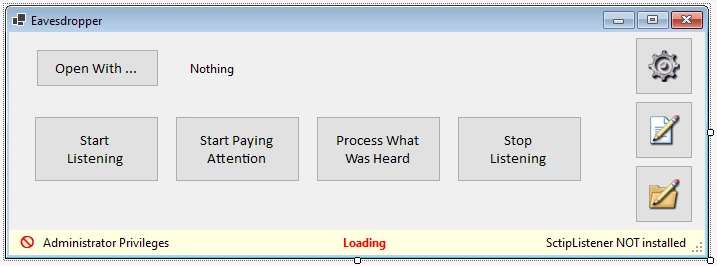
As far as how I'm using it, I have big plans, but for now I need to get a handle on the ActionDescriptor/ActionReference interface using ScripListener. To that end I wrote a utility called Eavesdropper that copies the ScripListener.8li file to the Plug-ins folder, starts Photoshop, then deletes the script logs to get rid of all the startup nonsense. Once the desired actions have been recorded the program moves the log(s) to a time stamped filename in a Snippets folder. When done recording, it shuts down Photoshop, waits for the process to exit, and deletes the plugin. You can then load the snippet into a proprietary editor that allows you to strip out all those superfluous lines like "SET objApp = CreateObject("Photoshop.Application")", remove unnecessary words like "SET" and "Call", and replace things like "idBrsh = objApp.CharIDToTypeID( "Brsh" )" with "PSConstants.phClassBrush" using a Dictionary object that contains all the CharID's and their corresponding type constants. This results in code that can be easily refactored into something a little cleaner for .NET to work with. It was originally just for my own use, but I've been building error checking into it so I can post it online at some point. It works quite well, is completely portable,  and automates most of the painful tedium that ScriptListener can propagate.It's a simpl idea, but a very handy one...



5 replies

Participant
November 16, 2024

Hello,

I have found some more that I think can help solve the problem of Visual Studio failing to recognise Photoshop following the installation of a new Photoshop Version. 

You can do a Registry search for "ScriptingSupport.8li", and if you are having the problem you might find that not all the references you find to this file in the registry point to the new Photoshop Installation directory.

I found a number of references to the "ScriptingSupport.8li" file, with just one of them pointing to my old installation folder. Changing this one entry to the new installation folder fixed the problem completely!

The Registry item with the old address in it was: "HKEY_LOCAL_MACHINE\SOFTWARE\Classes\TypeLib\{E891EE9A-D0AE-4cb4-8871-F92C0109F18E}\1.0\0\win64" (on my PC).


I hope this was helpful!

Participant
January 2, 2024

I had the problem where I couldn't control Photoshop 2024 from VB.Net the way I could control Photoshop 2023.


What I did was copy the "ScriptingSupport.8li" file  from "\Adobe\Adobe Photoshop 2023\Required\Plug-ins\Extensions" to "\Adobe\Adobe Photoshop 2024\Required\Plug-ins\Extensions" and it now works!.


The Photoshop 2023 "ScriptingSupport.8li" file is nearly 1 Mb bigger than the Photoshop 3034 version and works in Photoshop 2024. You could try backing up the original 2024 file first though just in case.


I hope someone finds this useful!

Tom Ruark
Inspiring
October 21, 2022

Glad you are up and running. Let me know when you post your project. Depending on what interface you use, it might change from version to version. This enables you to have both Photoshop 2022 and Photoshop 2023 installed and can start and stop each one as desired.

Petey B goodAuthorCorrect answer
Participant
October 21, 2022

Wow... that was a LOT of information...

I ended up uninstalling 24.0 (2023) and reinstalling 23.5 (2022). I saved the object library from 2023 for comparison. Once I re-referenced the ScriptingSupport.8li and TypeLibrary.tlb files everything worked again. Some things I noticed:

  • The 2022 object library appears in the solution explorer as "Interop Photoshop" while the 2023 library was just a {...class ID ? ...} with a load error symbol next to it
  • initially the 2022 type library was no good, but I found an older one on the web that worked (it was 3K smaller but it loaded). When I reinstalled Photoshop 2022 both files could be referenced without any errors.
  • the ScriptingSupport.8li files are almost identical, with the 2022 version being 11.5K larger. I'm willing to bet that if I reinstalled Photoshop 2023 the 2022 object library would work .

As far as how I'm using it, I have big plans, but for now I need to get a handle on the ActionDescriptor/ActionReference interface using ScripListener. To that end I wrote a utility called Eavesdropper that copies the ScripListener.8li file to the Plug-ins folder, starts Photoshop, then deletes the script logs to get rid of all the startup nonsense. Once the desired actions have been recorded the program moves the log(s) to a time stamped filename in a Snippets folder. When done recording, it shuts down Photoshop, waits for the process to exit, and deletes the plugin. You can then load the snippet into a proprietary editor that allows you to strip out all those superfluous lines like "SET objApp = CreateObject("Photoshop.Application")", remove unnecessary words like "SET" and "Call", and replace things like "idBrsh = objApp.CharIDToTypeID( "Brsh" )" with "PSConstants.phClassBrush" using a Dictionary object that contains all the CharID's and their corresponding type constants. This results in code that can be easily refactored into something a little cleaner for .NET to work with. It was originally just for my own use, but I've been building error checking into it so I can post it online at some point. It works quite well, is completely portable,  and automates most of the painful tedium that ScriptListener can propagate.It's a simpl idea, but a very handy one...


Tom Ruark
Inspiring
October 20, 2022
Please download the attached file to view this post