
Photoshop 2024 loads quickly, but the UI remains unresponsive for 30-50 seconds.
My issue is exactly what the title of this post is. When PS launches, the title screen appears and completes in about 5-10 seconds and the UI then loads. The problem is, I can't interact with Photoshop for upwards of 30-50 seconds. Every button refuses to respond to mouse clicks, I can't open menus, etc.
So effectively I can't use Photoshop for close to a minute upon opening the application.
- I'm using the latest NVIDIA Studio Drivers for my GPU (RTX-2080Ti).
- I've updated PS to the latest version.
- I have a very minimal set of addons installed. Just two: ALCE, and Double USM. (https://www.cc-extensions.com/plugins)
- I have copious amounts of free space on my system drive and data drive (1.4TB on System, and 860GB on Data). Both are selected as Scratch Disks.
- I have 64GB of RAM, with about 44GB allocated to Photoshop.
- Here are my performance settings:

- I've tried resetting my preferences several times with no effect or change to my startup time.
- I've deselected "Allow Extensions to Connect to the Internet" under "Plugins > Legacy Extensions"
- I've deselected "Load Extension Panels" under "Plugins > Legacy Extensions"
- Developer mode is disabled.
- I'm on Win10 with all latest updates enabled.
- I have optimized my computer heavily and keep background processes to an absolute minimum.
It's really frustrating because when I want to make a quick edit to an image, I have to basically wait a minute before I can do anything with the app.
I'm hoping someone here knows any possible solutions to this, or a way I can debug Photoshop during this startup stage to isolate the problem. I'm thinking of trying Windows Performance Toolkit (https://learn.microsoft.com/en-us/windows-hardware/test/wpt/) to see if I can capture what's causing the delay, but it's a bit over my head at the moment.
Has anyone else here (On Windows) experienced this? I am pretty desperate for some kind of solution.
Any help or suggestions would be greatly appreciated!
Edit: Just wanted to add:
I have a 4K monitor, with G-SYNC and HDR.
HDR is disabled completely on my system.
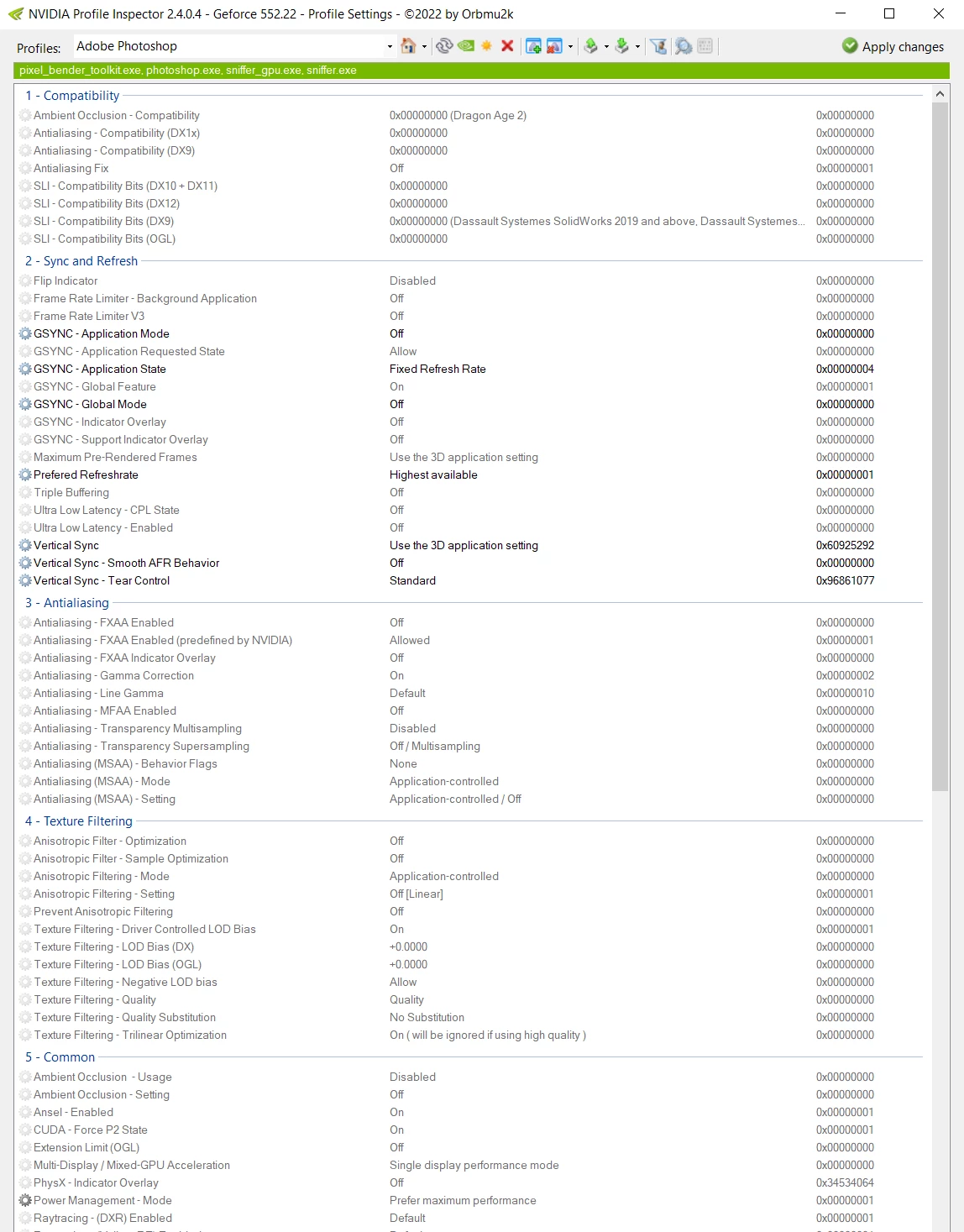
G-Sync is enabled, but I used NVIDIA Profile Inspector to disable it for Photoshop as well as change a few settings to see if it would help. It didn't.
Here's the profile:
Edit 2 and a Solution!
Alright, I feel stupid. I just now happened to come across a Reddit thread where the user was having the exact same problem:
https://www.reddit.com/r/photoshop/comments/1am8pdc/photoshop_is_extremely_slow_and_lagging_only_at/
Someone then responded to try turning OFF font preview:
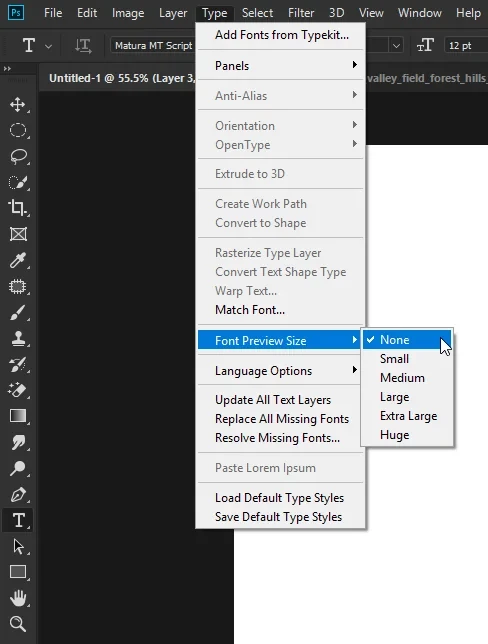
After doing this, It COMPLETELY solved the problem! Interface is snappy as can be now. So, if anyone else is experiencing this issue, try disabling font previews.
I have to say though - It's a complete shame that we have to sacrifice font previews for a responsive interface. I am a typography enthusiast and large font previews are a massive quality of life improvement. I really hope Adobe manages to see this and/or that reddit thread and provides some kind of fix or patch.
 AdChoices