
Participant
November 25, 2019
Question

Photoshop 21.0.1 group text layer stroke bug

  • November 25, 2019
  • 1 reply
  • 526 views

On Photoshop 21.0.1 on macOS Catalina 10.15.1


When applying an outside stroke to a group containing text and text drop shadow the group stroke gets cutoff at the bottom and is not wrapping around the orange drop shadow.
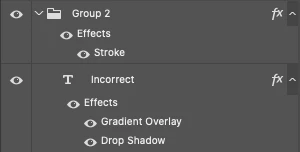
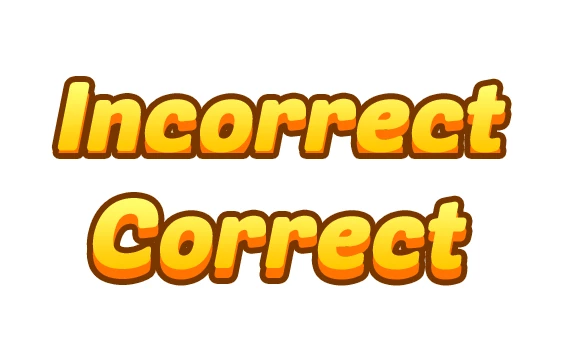
The intention is for the brown stroke to wrap around the orange drop shadow as i'm showing here in the "Correct" text. To get this effect to show you the example I had to flatten the text to apply the stroke which I never had to do in previous builds. 


This topic has been closed for replies.

1 reply

Jeff Arola
Community Expert
Community Expert
November 25, 2019

Go to Photoshop>Preferences>Pereformance and check Legacy Compsiting.


Looks like it's related to this bug:


https://feedback.photoshop.com/photoshop_family/topics/photoshop-cc-2020-layer-effects-on-groups-clipping-error

peternudoAuthor
Participant
December 4, 2019

It's not checked on to begin with...

Jeff Arola
Community Expert
Community Expert
December 4, 2019

Sorry, it should read check Legacy Compositing.