Participating Frequently
January 2, 2020
Question

Photoshop 21.0.2 doesn't use selected scratch disc

  • January 2, 2020
  • 1 reply
  • 574 views

Hello,


I have MacBook Pro 2017 with 128GB SSD and external WD My Passport 256GB with over 190GB of free space.


When I go to Preferences - Scratch Discs in Photoshop (please see screenshot below) it shows my local SSD's free space on both discs, which is incorrect and it apparently use only the local SSD even if only the external one is checked.


Thanks in advance for any help, it is really urgent as I can't get my work done surrounded by so many deadlines!


EDIT: Photoshop version is 21.0.2

D.
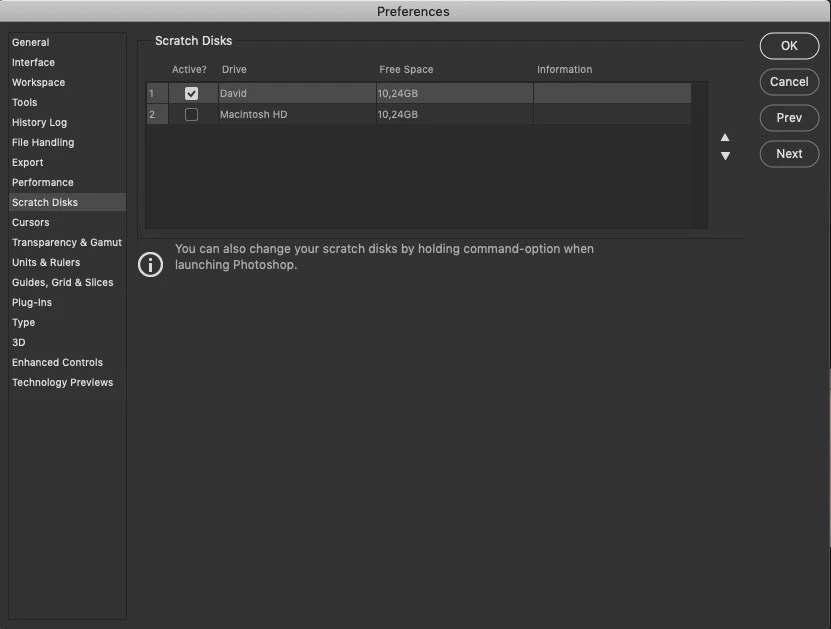
 

This topic has been closed for replies.

1 reply

nikunj.m
Legend
January 2, 2020

Hi there,


We are sorry about the experience with Photoshop.


Would you mind checking the format of your WD my passport connected to the computer? For the drive to work correctly as Scratch disk with Photoshop on macOS, the drive should be in macOS extended file format. If the drive is not in the specified format, Photoshop would not be able to detect it. (Most drives are in NTFS format out of the box which is basically a Windows file system format)


If the drive is in the correct format, you can try resetting the preferences of Photoshop using the steps mentioned here: https://helpx.adobe.com/in/photoshop/using/preferences.html


You may want to backup your actions, brushes, etc. before resetting the preferences. Please check: https://helpx.adobe.com/in/photoshop/using/preset-migration.html


Regards,

Nikunj

Participating Frequently
January 2, 2020

Hello Nikunj,


Thanks for your response!


Unfortunately none of the suggestions works for me...

The disc is Mac OS extended (Journaled) and I reset the preferences, no change.


Do you have any other suggestions? 


EDIT: The problem is only with the 2020 versions of Photoshop.


Best Regards


David

nikunj.m
Legend
January 6, 2020

Thank you for the information David. Would you mind sharing the macOS version you are currently using?