djile
Known Participant
December 23, 2019
Question

Photoshop 21.0.2 tool presets not working and artifacts problem AMD Radeon RX 580 graphics card

  • December 23, 2019
  • 3 replies
  • 972 views


Hi there,

I have a problem with tool presets, I have to load my saved tool presets every time when I open photoshop,  instead as in previous versions of photoshop I only load once and every time I open photoshop my brushes were in the tool presets panel,  in Photoshop 21.0.2 version this is a problem.

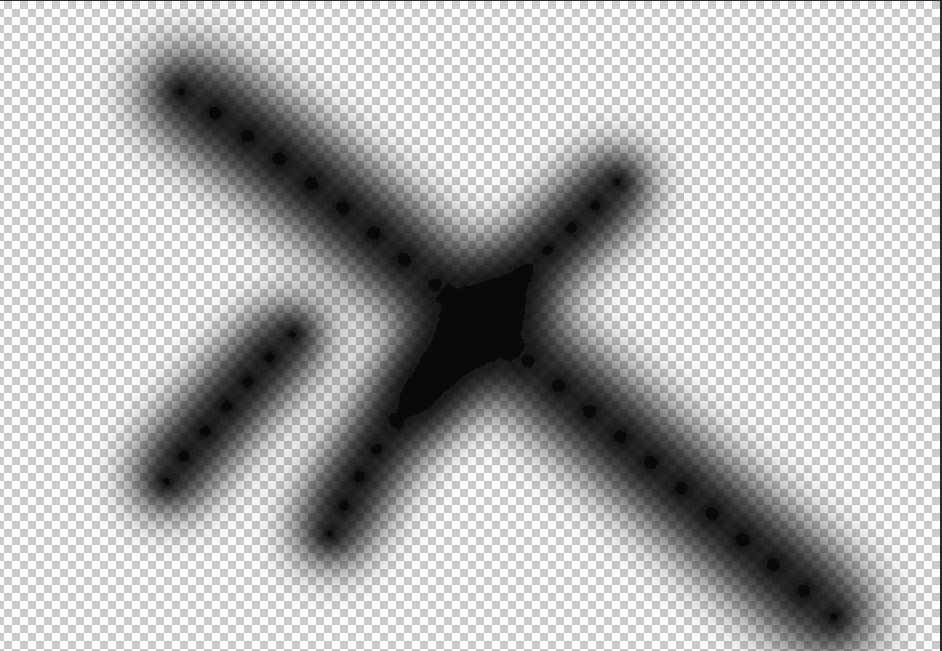
Also, in this version of photoshop, artifacts and bending appear very visible on papers backgrounds (studio),  nothing like this has ever happened to me before, whether it's file 16 or 8bits.
I also went to buy a new Radeon RX 580 graphics card and the problem is still there (display eizo cs2410)


The example was done with a brush on a 16bits file (I put noise to eliminate banding)
look at transitions
 

{Thread renamed by moderator}


This topic has been closed for replies.

3 replies

davescm
Community Expert
Community Expert
December 24, 2019

If you mean the harsh stepping in the middle, rather than the dots created by brush spacing,  it has been around for a while. It is only in the preview and only when viewed against the transparency checkerboard. Put a white layer underneath and you will see that the image itself is OK.


Dave

djile
djileAuthor
Known Participant
December 25, 2019

Hi Dave and Thank You, 

I know that, but i generally had a problem with badning and art artifacts.
And I solved the problem. 

I did a photoshop update at the same time update ColorNavigator 6 - Color Management Softwar,

but I didn't read this:
[NOTE for Windows 10]
In Windows 10 May 2019 Update (Windows 10, version 1903), there is a problem that ICC profile creation fails. Please do not apply the Update until the OS permanent measure is implemented.


Problem fixed

Michael Bullo
Community Expert
Community Expert
December 24, 2019

In reference to your "banding" issue, have you tried reducing the Spacing option found at the bottom of the Brush Tip Shape section of the Brush Settings panel?

Participant
December 24, 2019

Hi Michael, 
I tried but the problem is still the same.
I installed an older version of photoshop and everything is normal. But the problem with Tool presets remained, photoshop for some reason can't remember my tool presets,  every time i have to reload my tool presets.

Thank You for response and for Your hep and time.

Sahil.Chawla
Adobe Employee
Adobe Employee
December 23, 2019

Hi there,

That does not look like a typical experience, could you please try enabling "Legacy compositing" located in Photoshop's Preferences > Performance, then relaunch Photoshop and let us know if it helps? 


You may also try deselecting "Use Graphics Processor" located in Photoshop's Preferences > Performance, then relaunch Photoshop and see how it goes.

Regards,
Sahil

Participant
December 24, 2019

Hi there, 
thanks for the reply.

Yes I tried it all, I even installed clean windows 10, did every update installed all the latest drivers and when that didn't work, i went and bought a new graphics card.  The problem is still there... Artifacts and badning are especially seen when I use masks,  simply, masks don't look smooth when using brushes or gradient. I do dodge and burn a lot and it is very important that my masks work perfectly.
Also, what about  tool presets?

I will probably do the downgrade.

Thank You