
Inspiring
March 1, 2020
Answered

Photoshop 21.1 Blank Camera Raw Dialog iMac Catalina 10.15.3

  • March 1, 2020
  • 1 reply
  • 1174 views

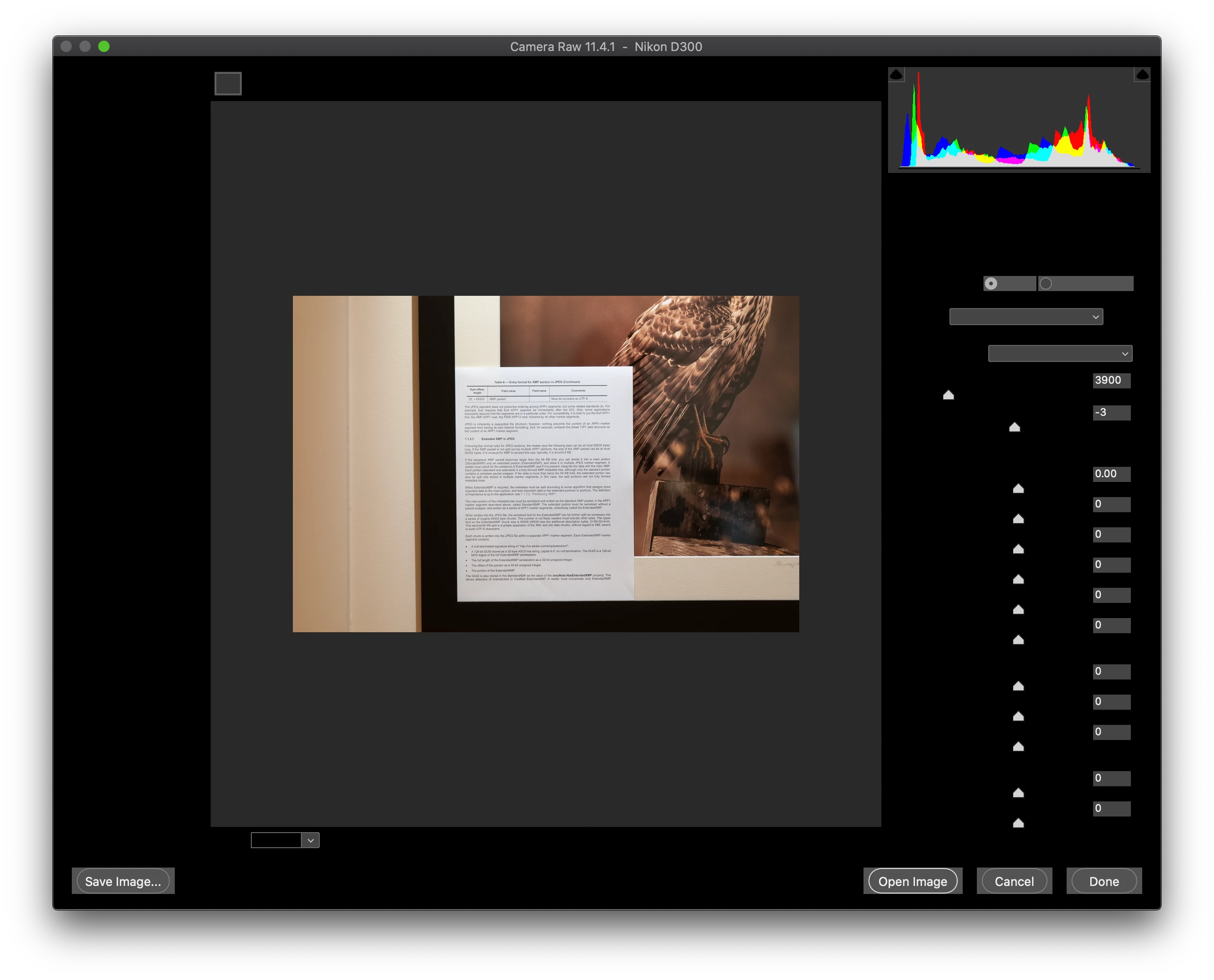
When opening a Nikon raw file from Bridge, Photoshop 21.1 launches, then opens the Camera Raw dialog, as expected. But the Camera Raw window is corruptly displayed. All labels, drop down lists, and dialog content is blank. The image area shows the image being edited.


I've uninstalled and reinstalled twice, with a restart in between. I've cleared the preferences. I've tried turning off graphics acceleration. Nothing corrects this problem. See image.


When resizing the Camera Raw window, the dialog controls smear and do not repaint correctly.


I've uninstalled and now installed Photoshop v 20.0.8. It works fine. None of the display issues and it runs with graphics acceleration enabled. I'm running a brand new iMac (Retina 5K, 27-inch, 2019) with Catalina 10.15.3 with all patches applied. This Mac has a Radeon Pro 575X 4 GB which is correctly recognized in the preferences.


This topic has been closed for replies.
Correct answer Mauiboy

Sorry, should have mentioned. Restarting did not fix the problem back when I had PS 21.1 loaded. And clearing the preferences also did not help. However, I did not restart between uninstalling and reinstalling.


Success!


Uninstalled Photoshop and Bridge, and Camera Raw was also uninstalled automatically. Restarted. Installed Photoshop 21.1. Camera Raw 12.2 was installed. Verified everything was copacetic and then installed Bridge.


All functioning now. Happy.


Very grateful to Just Shoot Me for flagging the problem.


1 reply

Just Shoot Me
Legend
March 1, 2020

First for some reason you are using an OLDER version of ACR. The ACR version that is supposed to be installed with PS 21.1 is 12.2.


You seem to be using 11.4.1.


Open the CC DTA and Update whatever comes up as needing updating.

MauiboyAuthor
Inspiring
March 1, 2020

Thanks for flagging that. As it turns out, CC DTA offers no additional updates. I’ve tried uninstalling all versions of Photoshop and reinstalling latest Photoshop.  I may have to uninstall Bridge and Lightroom Classic as well to get this cleaned up.

 
Would be great if I could force the CR12 update somehow with less effort.
 
Anyone know if there’s a way to do that?
 
In the below, I've downgraded Photoshop to 20.0.8, but Lightroom Classic and Bridge are fully up to date. What you see here is that no update is offered for Camera Raw (and no dots menu to select a different version):
 
Just Shoot Me
Legend
March 1, 2020

What version of Mac OS are you running?