Participating Frequently
February 3, 2021
Answered

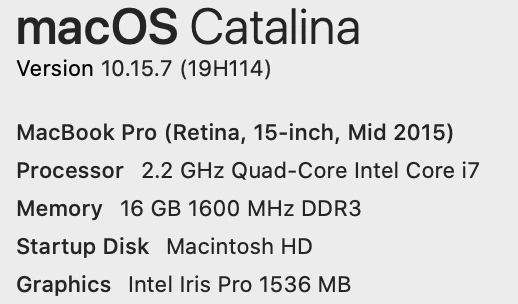
Photoshop 22.1.1 lagging on macOS Catalina (10.15.7)

  • February 3, 2021
  • 1 reply
  • 852 views

Everything lags in PS 2021 after last update. I mean everything! It's unnaceptable that we pay a premium pricetag for virtually zero Adobe support and accountability.  Adobe better respond or fully refund. After decades of running Photoshop premium with no issues, we are being forced to seek out to other alternatives only due to Adobe's negligence to finally solve their glitches once and for all.


{Thread title edited by moderator}

This topic has been closed for replies.
Correct answer nikunj.m

Hi,


We're sorry about the trouble with Photoshop. Since you're using macOS Catalina, please go to the System Preferences for your Mac, then Security and Privacy, then select the Privacy tab. Then select Accessibility from the list to the left & check if Photoshop is added to the list with a check mark in front of it. If Photoshop is not a part of the list, please add it by unlocking the window first using the lock at the bottom left, then clicking the + icon & navigating to the Applications folder. Also, grant permissions to Photoshop under Full disk access located in the same list as Accessibility. Once done, restart the Mac & check if it helps.


You can also try to optimize the preferences of Photoshop using the steps suggested here: https://helpx.adobe.com/photoshop/kb/optimize-photoshop-cc-performance.html


If the issue persists, you can try to reset the preferences of Photoshop using the steps mentioned here: https://adobe.ly/2Qzc0K3

Please backup your settings prior to resetting the preferences. You can check: https://adobe.ly/2vNz6FG


Let us know how it goes!

Regards,

Nikunj
1 reply

nikunj.m
nikunj.mCorrect answer
Legend
February 4, 2021

Hi,


We're sorry about the trouble with Photoshop. Since you're using macOS Catalina, please go to the System Preferences for your Mac, then Security and Privacy, then select the Privacy tab. Then select Accessibility from the list to the left & check if Photoshop is added to the list with a check mark in front of it. If Photoshop is not a part of the list, please add it by unlocking the window first using the lock at the bottom left, then clicking the + icon & navigating to the Applications folder. Also, grant permissions to Photoshop under Full disk access located in the same list as Accessibility. Once done, restart the Mac & check if it helps.


You can also try to optimize the preferences of Photoshop using the steps suggested here: https://helpx.adobe.com/photoshop/kb/optimize-photoshop-cc-performance.html


If the issue persists, you can try to reset the preferences of Photoshop using the steps mentioned here: https://adobe.ly/2Qzc0K3

Please backup your settings prior to resetting the preferences. You can check: https://adobe.ly/2vNz6FG


Let us know how it goes!

Regards,

Nikunj

Participating Frequently
February 5, 2021

SOLVED: Photoshop 2021 (latest) back to normal after Adobe's recommendation.

The following changes on system preferences alone did the trick for me, but first I deleted and re-installed Photoshop.
What adobe recommended:

On macOS Catalina, please go to the System Preferences for your Mac, then Security and Privacy, then select the Privacy tab. Then select Accessibility from the list to the left & check if Photoshop is added to the list with a check mark in front of it. If Photoshop is not a part of the list, please add it by unlocking the window first using the lock at the bottom left, then clicking the + icon & navigating to the Applications folder. Also, grant permissions to Photoshop under Full disk access located in the same list as Accessibility. Once done, restart the Mac & check if it helps.


You can also try to optimize the preferences of Photoshop using the steps suggested here: https://helpx.adobe.com/photoshop/kb/optimize-photoshop-cc-performance.html


If the issue persists, you can try to reset the preferences of Photoshop using the steps mentioned here: https://adobe.ly/2Qzc0K3

Please backup your settings prior to resetting the preferences. You can check: https://adobe.ly/2vNz6FG


Max Tovar
Senior marketing creative.
Pro-Family Activist and Incubator.
[Website and contact details removed by moderator - please follow the forum guidelines]