
Legend
May 8, 2021
Question

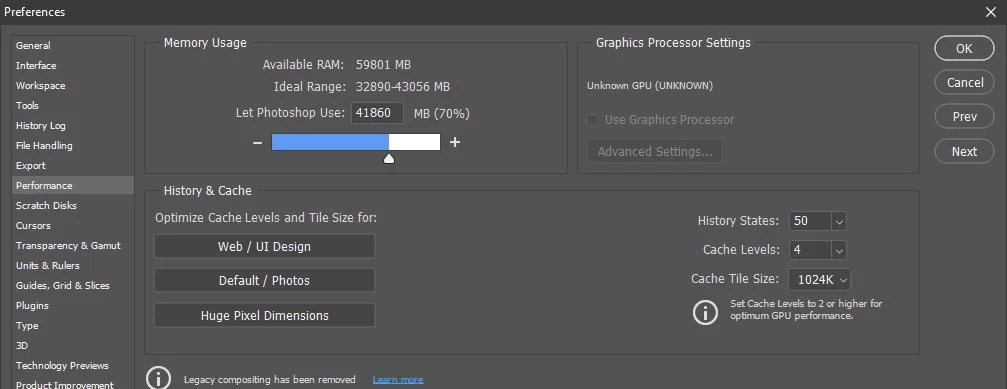
Photoshop 22.3.1 Graphic Processor Settings Not Working

  • May 8, 2021
  • 1 reply
  • 2288 views

Hello Everyone.

I have the latest version of the Graphic Card: NVIDIA GeForce RTX 2070 SUPER.  Inside Preferences-Performance Use Graphic Processor Is Dimmed-Out. Here is the Screen-Shot.

Thanks
This topic has been closed for replies.

1 reply

gener7
Community Expert
Community Expert
May 8, 2021

There's a lot of reports of the v22.3.1 update not recognizing video cards. Try rolling back to 22.3

https://helpx.adobe.com/download-install/using/install-previous-version.html

Legend
May 8, 2021

Dear gener7.

I did roll back to version 22.3, and now I see the Use Graphic Processor, Thanks A lot. I was told the reason I can not see the Neural Filters is because of this Issue. But still, I can not open the Neural Filters. I try clicking, and Dragging the slider, nothing happens. Here is the Screen-shot

Thank you very much.

gener7
Community Expert
Community Expert
May 9, 2021

Sorry I'm late. I'm able to slide that switch on and move the sliders for that filter.

I am using a really old Intel HD4300 integrated laptop gpu with these settings:

You can try and make your image a Smart Object or do some GPU troubleshooting.

I'd start with rebooting your PC and resetting Prefs:


If that fails, see if this helps:

https://helpx.adobe.com/photoshop/kb/troubleshoot-gpu-graphics-card.html