Answered
Photoshop 23.0.1 GPU Drawing Mode options not showing
Hello,
I have notice that there is another post about this exact issue, though it was an older version and the fix was that there was a new version (22.1.1) that needed to be updated in order for the drop down dialogue options to appear when navigating to
Preferences -> Performance -> GPU Advanced Settings
I updated to the latest version of PS, which is 23.0.1, and still this option does not appear for me to change;
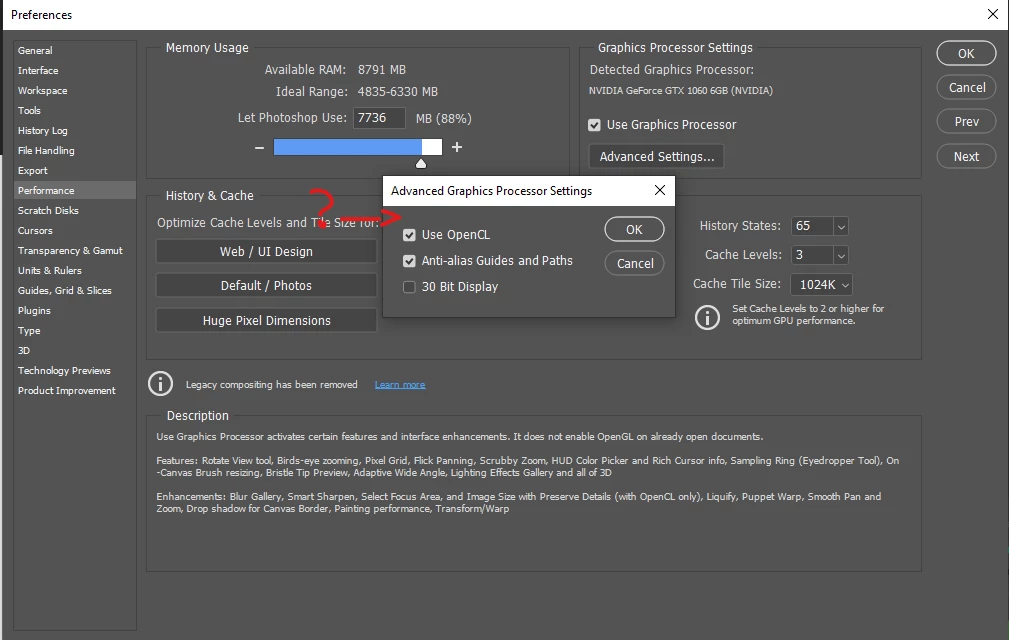
I am wanting to see if I can reduce lag when using the Symmetry tool if I change it to "Basic", as my PC specs are not exactly "Up to date". My processor is about 10 years old and I'm needing to look for ways to optimize using Symmetry that does not require me to durastically lower the document size that I am working on.
 AdChoices