
Participant
January 27, 2022
Question

Photoshop 23.1.1 Resizing frame freezes

  • January 27, 2022
  • 3 replies
  • 301 views

I have a problem with lines freezing on the screen while resizing. This issue has been around for a long time and continue to bother me after several upgrades of Photoshop. Please does any one have the same issue? And hopefully a solution. 
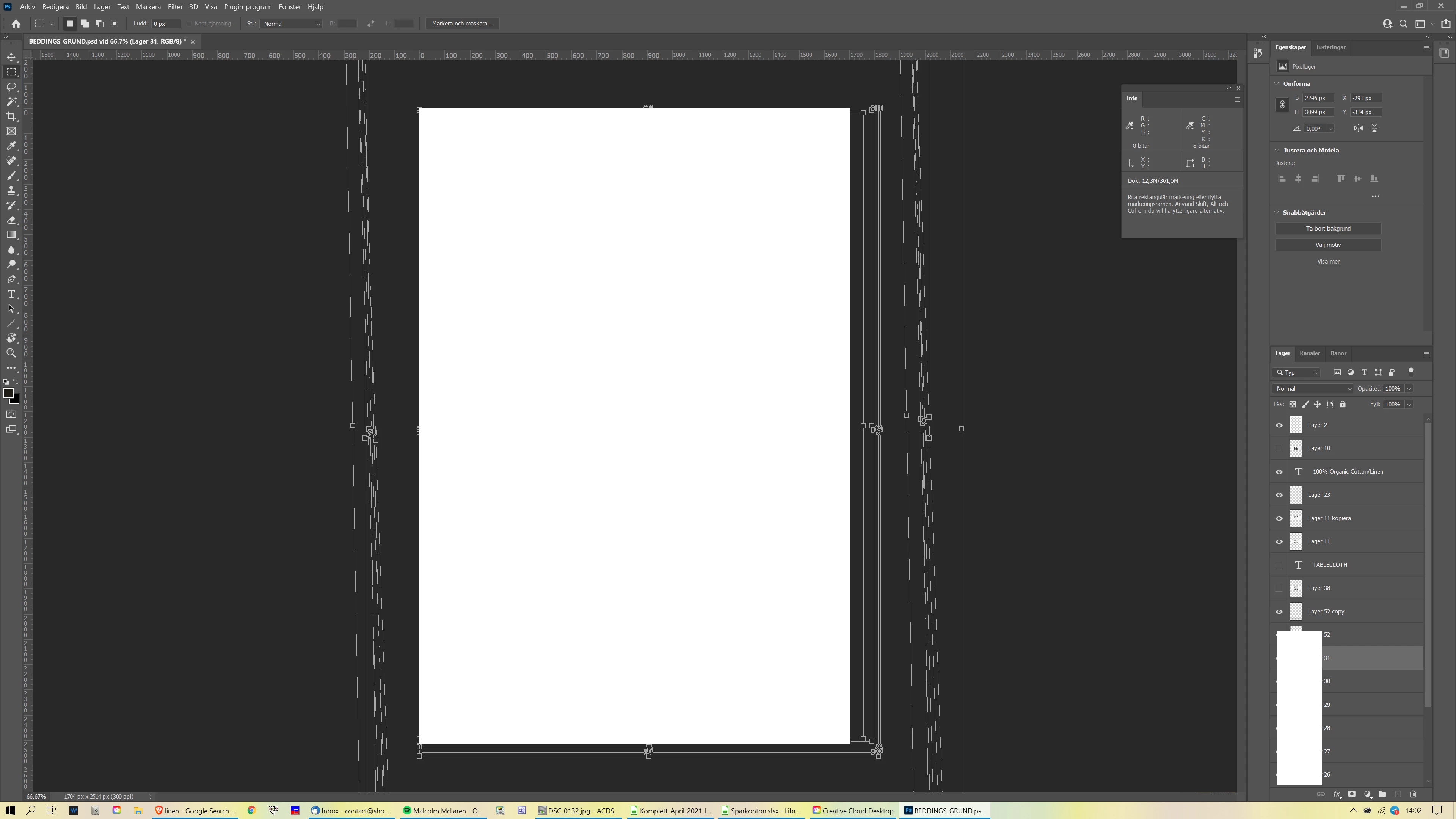
This topic has been closed for replies.

3 replies

Legend
January 27, 2022

Go to Preferences > Technology Previews... and check "Disable Native Canvas" - then restart Photoshop. Does the problem still occur?

Participant
January 28, 2022

Dear Jeffrey!

Wow, it seems to work!! 
I will check this during the day to see that it will stay this way!


Thank you all for helping out!


/ Andreas

Participant
January 27, 2022

Hi!
Thanks for the quick reply!!

Operativsystemets namn Microsoft Windows 10 Home
Version 10.0.19042 version 19042
Ytterligare beskrivning av operativsystemet Inte tillgängligt
Operativsystemets tillverkare Microsoft Corporation
Datornamn DESKTOP-6AHE9UA
Datortillverkare Dell Inc.
Datormodell Inspiron 7777 AIO
Datortyp x64-based PC
System-SKU 0850
Processor Intel(R) Core(TM) i7-8700T CPU @ 2.40GHz, 2400 Mhz, 6 kärnor, 12 logiska processorer
BIOS-version och -datum Dell Inc. 1.2.15, 2021-09-06
SMBIOS-version 3.1
Version av inbäddad styrenhet 255.255
BIOS-läge UEFI
Baskortstillverkare Dell Inc.
Baskortsprodukt 0KRJ4N
Baskortsversion A01
Plattformsroll Stationär dator
Tillstånd för säker start På
PCR7-konfiguration Privilegiehöjning krävs för visning
Windows-katalog C:\WINDOWS
Systemkatalog C:\WINDOWS\system32
Startenhet \Device\HarddiskVolume3
Nationella inställningar Sverige
HAL (Hardware Abstraction Layer) Version = "10.0.19041.1151"
Användarnamn DESKTOP-6AHE9UA\Andreas
Tidszon Västeuropa, normaltid
Installerat fysiskt minne (RAM) 16,0 GB
Sammanlagt fysiskt minne 15,8 GB
Tillgängligt fysiskt minne 6,09 GB
Sammanlagt virtuellt minne 18,2 GB
Tillgängligt virtuellt minne 3,01 GB
Växlingsfilsutrymme 2,38 GB
Växlingsfil C:\pagefile.sys
Kernel DMA-skydd Av
Virtualiseringsbaserad säkerhet Inte aktiverat
Enhetskrypteringsstöd Privilegiehöjning krävs för visning
Hyper-V - Tillägg för VM-övervakningsläge Ja
Hyper-V - Tillägg för adressöversättning på nivå två Ja
Hyper-V - Virtualisering aktiverad i inbyggd programvara Ja
Hyper-V - Dataexekveringsskydd Ja

josephlavine
Community Expert
Community Expert
January 27, 2022

This sounds like a possible GPU issue. If possible, please share information regarding your computer system 

and a screen capture from Photoshop's Performance Preference.

warmly/j