
Participant
April 8, 2022
Question

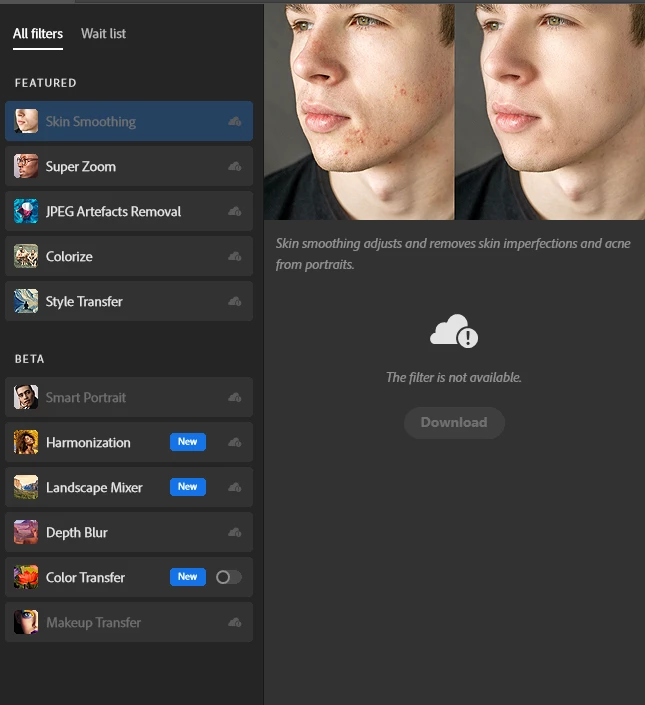
Photoshop 23.2.2 - Neural filters "not available"
  • April 8, 2022
  • 1 reply
  • 4621 views

Hi all 
i'm having this issue since day one 
once I try to download them I get "This filter is not available" for every filter i try to download 
I already reinstalled and tried to delete the internal plugin folder as suggested by another user. 
Any suggestions? 

Thanks 


This topic has been closed for replies.

1 reply

Sameer K
Community Manager
Community Manager
April 8, 2022

Hi there, 


Thanks for reaching out! We are sorry about the trouble with Neural filters in Photoshop 2022 on Windows. We are here to help!
Have you tested this with any different internet networks? Do you have any firewall/protection software enabled? Are you logged in to the Creative Cloud Desktop app?


Please share if you have tried any other troubleshooting steps. Please try the steps mentioned and let us know if this helps you. 

  • Open Creative Cloud from the taskbar or use windows search & from the top right of the Creative Cloud Desktop app, click on your profile and choose to Sign out.  
  • Once signed out, please log in again, launch Photoshop from Creative Cloud, and check if the issue persists.  

If this does not work, please try the steps below.

  • Please navigate to the following installation location of Photoshop on Windows. 

C:\Program Files\Adobe\Adobe Photoshop 2022 

  • Here, look for Photoshop.exe and right-click on it to Run as Administrator.  
  • Try downloading Neural Filters now.  


Please check here for more steps and guidance: https://helpx.adobe.com/photoshop/using/neural-filters-feedback.html  

For FAQ about Neural Filters, check here: https://helpx.adobe.com/photoshop/using/neural-filters-list-and-faq.html 


We hope this helps you out. Let us know if it does.

Thanks!

Sameer K