
Known Participant
October 29, 2021
Answered

Photoshop 23 bug - brush blending mode didn't work correctly

  • October 29, 2021
  • 2 replies
  • 414 views

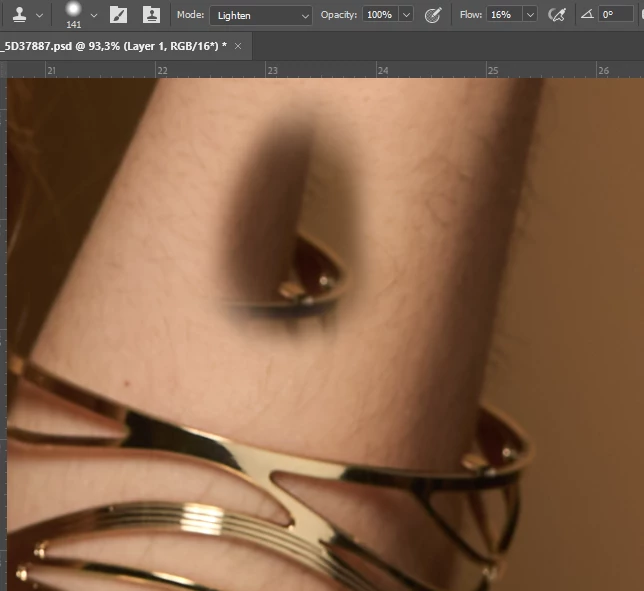
For exemple you can set the clone stamp tools in lighten mode and you can darken the image as shown on the image below. Here we should expect that almost nothing is paint since the tools is set on lighten and non in darken.

System info : 

Adobe Photoshop Version: 23.0.0 20211013.r.36 623993d x64
Number of Launches: 174
Operating System: Windows 10 64-bit
Version: 10 or greater 10.0.19043.1320
System architecture: Intel CPU Family:6, Model:10, Stepping:9 with MMX, SSE Integer, SSE FP, SSE2, SSE3, SSE4.1, SSE4.2, AVX, HyperThreading
Physical processor count: 4
Logical processor count: 8
Processor speed: 2395 MHz
Built-in memory: 16078 MB
Free memory: 10295 MB
Memory available to Photoshop: 11838 MB
Memory used by Photoshop: 70 %

This topic has been closed for replies.
Correct answer Sahil.Chawla

Hi there,

This is not a bug in Photoshop. It is working as expected. f you pick a source using the Clone stamp tool and change the blending mode of the tool, then the source need to be put on the layer which has the object and not an empty layer if you want to see the effect. The blending mode is not getting applied to an empty layer because it doesn’t contain any pixels to blend with. A quick workaround is to change the blending mode of the empty layer to Lighten to see the change.

Regards,
Sahil

2 replies

Known Participant
October 29, 2021

Hi Sahil, I was pretty sure it works like i describe before, but if you say it isn't I believe you. So my apoligies for the inconveniance. 

Sahil.Chawla
Adobe Employee
Sahil.ChawlaCorrect answer
Adobe Employee
October 29, 2021

Hi there,

This is not a bug in Photoshop. It is working as expected. f you pick a source using the Clone stamp tool and change the blending mode of the tool, then the source need to be put on the layer which has the object and not an empty layer if you want to see the effect. The blending mode is not getting applied to an empty layer because it doesn’t contain any pixels to blend with. A quick workaround is to change the blending mode of the empty layer to Lighten to see the change.

Regards,
Sahil