Participant
January 6, 2023
Question

Photoshop 24.1.0 - Actions : No longer editable ? Help needed

  • January 6, 2023
  • 3 replies
  • 579 views

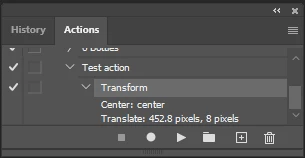
Dear all, need some quick help, my photoshop Actions panel no longer have the edit button 😞 

- replaced by "add new" (second left icon on the bottom right)

- double click on the specific command/step now runs this specifc step instead of letting me edit the action per Adobe's user guide. 


Many thanks 


My Actions panel: 
Adobe User Guide (extract from here) :

Overwrite a single command

  • In the Actions panel, double-click the command.
  • Enter the new values, and click OK.


This topic has been closed for replies.

3 replies

Bojan Živković11378569
Community Expert
Community Expert
January 7, 2023

"Actions panel no longer have the edit button"


What you mean by edit button? Where was that button in the past? I can not remember?

Stephen Marsh
Community Expert
Community Expert
January 6, 2023

In addition to the double-click on the action step that you wish to edit, there is also the corresponding menu command to "record again" on a selected action step:


Kevin Stohlmeyer
Community Expert
Community Expert
January 6, 2023

Double-click works on actions that have parameters that can be edited.

Your example of Transform is not something that can be edited once recorded, you need to record a new transform.

Double-clicking on a step like "Fill" Where there is a modal dialog box allows you to edit the action step directly.


komearmicAuthor
Participant
January 6, 2023
Thanks vy much for the reply.
That's means if i just want to adjust a few pixel, I have to record the
action all over again? Interesting...
Legend
January 6, 2023

You can record just the steps you want to change.