Larrymedia
Participant
May 8, 2023
Answered

photoshop 24.4.1 will not open DNG or NEF files

  • May 8, 2023
  • 3 replies
  • 1677 views

Photoshop 24.4.1 will not open DNG or NEF files. When photoshop tries to open the file it stops before getting to the RAW interface without a providing a error message. I have tried unistalling and reinstalling with no success. I have a second computer I use and when I try to open the DNG file it flashes a white screen. Running windows 10 enterprise Intel(R) Core(TM) i7-8700 CPU @ 3.20GHz 3.19 GHz 32 GB
This topic has been closed for replies.
Correct answer Ged_Traynor

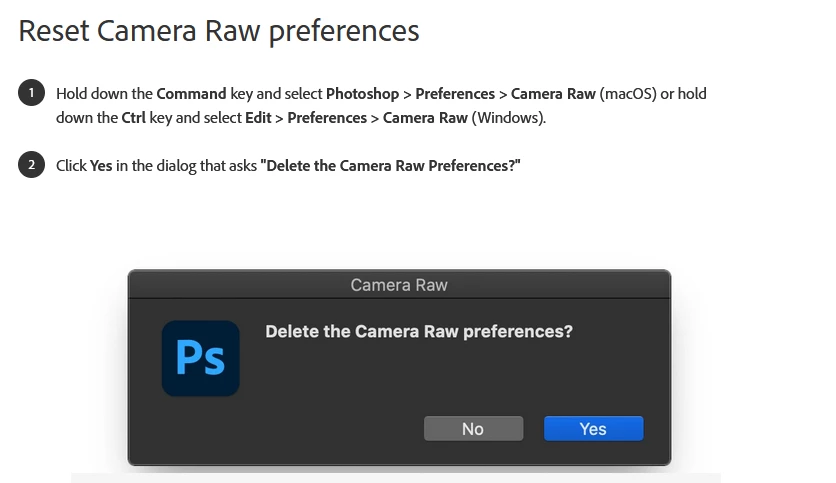
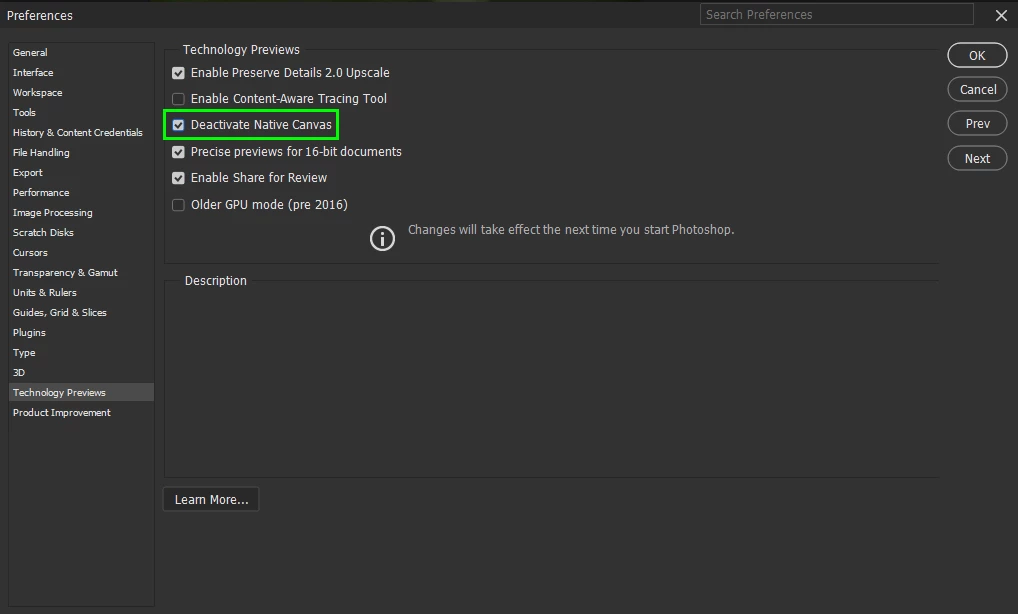
@Larrymedia for the flashing screen, go to Edit > Preferences > Technology Previews and enable this option, then restart Photoshop

Try resetting the ACR preferences

https://helpx.adobe.com/ie/camera-raw/using/camera-raw-settings.html

3 replies

Ged_Traynor
Community Expert
Community Expert
May 8, 2023

@Larrymedia you're welcome

Larrymedia
Participant
May 8, 2023

Thank you for the quick response. Both recommendation worked. Much appreciated.

Ged_Traynor
Community Expert
Ged_TraynorCommunity ExpertCorrect answer
Community Expert
May 8, 2023

@Larrymedia for the flashing screen, go to Edit > Preferences > Technology Previews and enable this option, then restart Photoshop

Try resetting the ACR preferences

https://helpx.adobe.com/ie/camera-raw/using/camera-raw-settings.html