Participant
December 17, 2023
Question

Photoshop 25.2.0

  • December 17, 2023
  • 7 replies
  • 423 views

Hello!

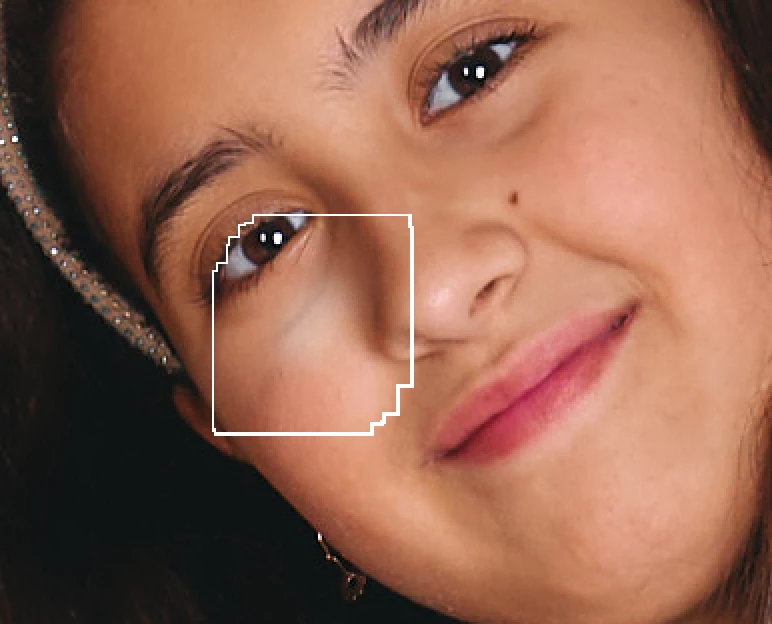
I have this strange think happening from last 3-4 versions and tools not work as expected.

See screen

This topic has been closed for replies.

7 replies

sanndoAuthor
Participant
December 31, 2023

Thank you! I will try this tip 🙂

mglush
Community Expert
Community Expert
December 31, 2023

Hi!

Have you tried resetting the Brush tool? 

With the Brush tool selected, in the Options bar click on the drop down menu indicator next to the Brush tool. Select the gear icon (settings) and choose Reset tool. See the image below.

Let us know if that works, or if you are still having the same issue?

Michelle

melissapiccone
Community Expert
Community Expert
December 30, 2023

You need a better explanation and screenshots for what you are experiencing. We can't figure it out with you have posted. What tools are you using, what is the expected behavior and what are you actually experiencing? Can you post screenshots with the entire screen - selected tool, layers, etc. 

Melissa Piccone | Adobe Trainer | Online Courses Author | Fine Artist
sanndoAuthor
Participant
December 30, 2023

sanndoAuthor
Participant
December 30, 2023

OK, is hatrd to explain... But when I work on some photos this show up on brush and is not possible to use it as way as espected. Realy rare on some other tools like healing brush show other artefacts. See screenshot below. Very simple edit. 

Kevin Stohlmeyer
Community Expert
Community Expert
December 22, 2023

@sanndo can you explain what the issue is? It's not very evident from the screenshot you sent. All I see is a large brush outline.

sanndoAuthor
Participant
December 22, 2023

Anyone with this issue?