



Godzinski
Inspiring
January 30, 2024
Answered

photoshop 25.4 lasso problem

  • January 30, 2024
  • 2 replies
  • 220 views

This topic has been closed for replies.
Correct answer Ged_Traynor

@Godzinski not seeing the issue here with Photoshop version 25.4 on Windows 10, have you tried resetting the tools
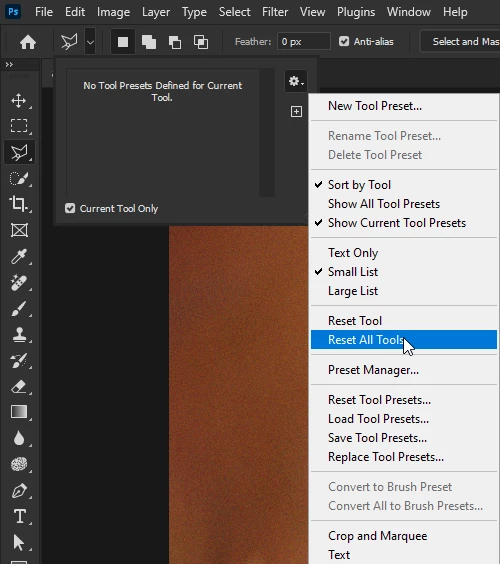
If that doesn't help, try manually resetting your Photoshop preferences
https://helpx.adobe.com/ie/photoshop/using/preferences.html#Manually
Remember to backup your settings before doing the preference reset
https://helpx.adobe.com/ie/photoshop/using/preset-migration.html

2 replies

Godzinski
GodzinskiAuthor
Inspiring
January 30, 2024

I will let you know at the end of the day if it helped, this lasso error appeared from time to time and it is difficult to say whether it will appear again after the above repairs


A whole day passed, after deleting the preferences files, most of the errors related to Photoshop version 25.4 stopped - thank you very much

Ged_Traynor
Community Expert
Ged_TraynorCommunity ExpertCorrect answer
Community Expert
January 30, 2024

@Godzinski not seeing the issue here with Photoshop version 25.4 on Windows 10, have you tried resetting the tools

If that doesn't help, try manually resetting your Photoshop preferences
https://helpx.adobe.com/ie/photoshop/using/preferences.html#Manually
Remember to backup your settings before doing the preference reset
https://helpx.adobe.com/ie/photoshop/using/preset-migration.html