
Participant
May 4, 2024
Beantwortet

Photoshop 25.7 Crashes on Launch; Older Versions Now Not Working

  • May 4, 2024
  • 6 Antworten
  • 923 Ansichten

Hi,

I'm running Mac OS 12.7.4 

PS 2023 was working fine for me. Then, I updated to Photoshop 25.7 six days ago.

PS 25.7 repeatedly crashes on launch — the application has never opened for me once.

I have uninstalled 25.7 and attempted to install older versions of PS. These all crash on launch now, too.

I tried deleting preferences files per others' suggestions online. Nothing helps.

I'm now unable to launch ANY version of Photoshop (and I'm paying for it just the same)

Can someone please help?

Thank you.
Dieses Thema wurde für Antworten geschlossen.
Beste Antwort von Jeff Arola

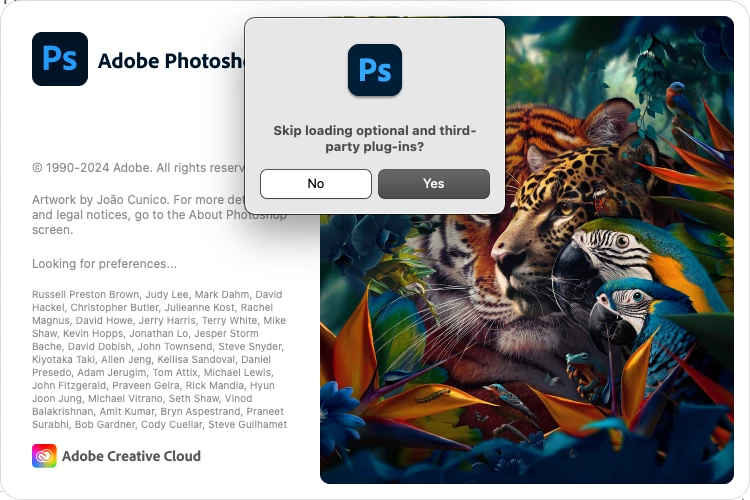
Try holding down the Shift key while starting Photoshop to see any plugins you have installed are causing the issue.

In the dialog that says skip loading optional and third party plugins press Yes


6 Antworten

Jeff Arola
Community Expert
Community Expert
May 5, 2024

If you open the Adobe Creative Cloud Application and look under Stock & Marketplace>Manage Plugins does it show any installed?


Jeff Arola
Community Expert
Community Expert
May 5, 2024

If you go to


Applications/Adobe Photoshop 2023/Plug-ins

or

Macintosh HD/Library/Application Support/Adobe/Plug-Ins/CC


there are no plugins in those folders besides the File Formats folder that has the Camera Raw plugin?

Participant
May 4, 2024

The weird thing is....I don't ever install third-party or optional plugins. 

Jeff Arola
Community Expert
Community Expert
May 4, 2024

Now you need to figure out which of your third party plugins is causing the issue.


One of the most common ones that causes this issue is Nik plugins/filters.

Participant
May 4, 2024

Thank you so much, Jeff, that worked! I'm running 24.0.1 until conditions improve with 25.7.  

Jeff Arola
Community Expert
Jeff ArolaCommunity ExpertAntwort
Community Expert
May 4, 2024

Try holding down the Shift key while starting Photoshop to see any plugins you have installed are causing the issue.

In the dialog that says skip loading optional and third party plugins press Yes