

Photoshop 27.3 Ignoring Intel Arc A770 GPU and Using CPU Instead
- January 28, 2026
- 4 replies
- 296 views
So, Intel Arc and Adobe Photoshop… It’s ugly 🫡
When I open a simple file in Photoshop 27.3, my CPU is nuked when doing simple things (like moving a layer)… PS is laggy, hard to use and quickly becomes a headache.
Here’s what I can tell and my debug process so far :
- SysInfo is attached. I’ll come back to this later
- GPU compatibility says that everything is compatible
- I’ve unplugged my second monitor : no results.
- I checked, unchecked, re-checked “use GPU” or any settings in the Performance menu : no results.
- Photoshop was re-installed many times without keeping any settings / cache. No results.
On the SysInfo file, you can clearly see where the problem is :
Composite Core GPU (comp_core_gpu): on
Composite Core Threads (MultithreadedCompositing): on
Composite Core UI (CompositingDocumentTabUI): off
Composite Core Feature Prefs (CompCoreFeaturePrefs): off
And it describes the bug pretty well. Mooving the canva / a layer is a pain in the *ss. But using the quick selection uses the GPU.
My intuition (ChatGPT’s intuition) was to try an older version of PS.
And guess what ?
I now have a fully functional program: smooth, easy to use, and that doesn’t nuke my computer !
So, I’ve concluded that the problem isn’t coming from Intel and its drivers, but Adobe themselves.
On a side note, I don’t have any issues with this exact same GPU on others Adobe program…
I’ve also found out that this bug “Composite Core UI (CompositingDocumentTabUI): off “ doesn’t not only concern Intel Arc GPU but sometimes Nvidia GPU (thanks Google)
Is there any chance that Adobe could fix this ?
I mean I and many others pay a lot for the suite every year, why couldn’t it be fixed ? And why would I need to use an older version (with way less features) because I don’t have THE main-stream GPU ?
PS : I’ve already created a topic on this issue, but it seems to be unavailable now…
My configuration :
- AMD Ryzen 9 7950x (iGPU is disabled from BIOS)
- 64Gb DDR5 @ 4800MT/s
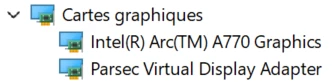
- Intel Arc A770 16Gb - Driver 32.0.101.8425
- 2To SSD (900Go empty)


 AdChoices