
Participant
September 4, 2017
Question

Photoshop 7 - Image Invert difficulty

  • September 4, 2017
  • 1 reply
  • 1910 views

Hello All,

   I am trying to follow a tutorial located at https://techlog360.com/create-a-water-drop-text-effect-using-photoshop/ but i am having difficulty at step number 22.  WHen I select the Image==>Invert, my image does not look like the image in the tutorial.  Here is what my image looks like after completing step 22.
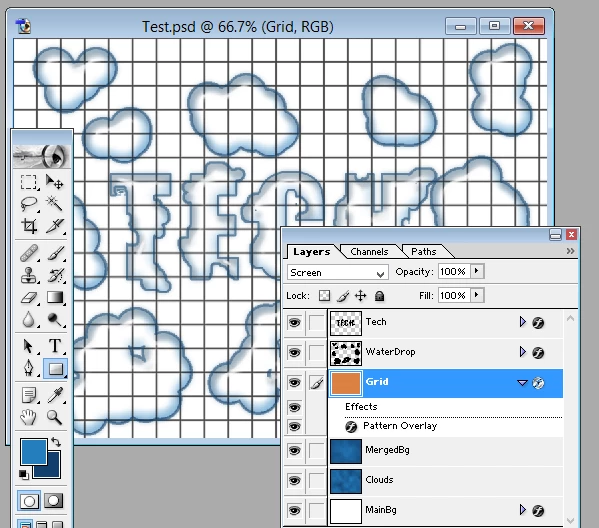
     Wondering if someone out there that has Photoshop 7 that can look at the tutorial and tell me maybe what I am doing wrong?  As you can see my grid line are not white and my foreground is not blue

Thanks in advance

Gary

This topic has been closed for replies.

1 reply

September 4, 2017

According to your screenshot in step 20 you've made a blue rectangle instead of a white one. Blue turns orange when inverted.

In step 22 you didn't right click on the grid layer and choose rasterize the grid layer. By rasterizing the black grid pattern will be integrated in the white area. Inverting this layer and it will be black with white grid pattern.

Fenja

g_speranAuthor
Participant
September 4, 2017

Thanks for your reply.

I'll be out of pocket  until this Friday evening when I will attempt to do it again.

Before making those screenshots I actually had the  foreground as white  and the  background color as black.  I did rasterize the layer and it still did not produce  The results expected.

I will attempt to re-create this and post again.

Thank you for your assistance in  Advance 

g_speranAuthor
Participant
September 5, 2017

I got to this sooner than expected.  Below are the screen shots taken

1 - Adding Grid Layer

2 - Adding White Square

3 - Adding Square Overlay

4 - Before rasterizing

5 - After Rasterizing

6- Before Inverting

7- After Inverting

So, the foreground is not blue and the grid lines are not white

Thanks for your assistance in advance