
Inspiring
August 8, 2017
Answered

Photoshop Action BATCH will not save to folder?

  • August 8, 2017
  • 1 reply
  • 2639 views

I use a lot of action in my work.. and never really had a problem before.. but I tried making a simple action today and I couldn't get it to work.

Basically all I want it to do is load every file in a folder, resize it, then same it to a different folder as a jpg. (some are PNGs)

  • I start an action recording
  • I open a file
  • I resize it
  • I save to new folder as jpg.. i use SAVE AS.

Then I go to batch and set it up like this...
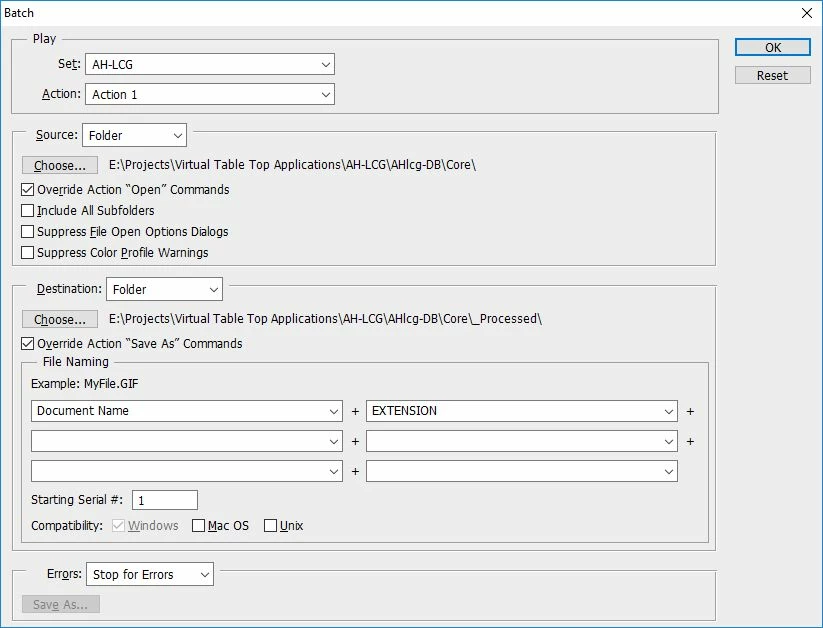
but now every time I run the action I get a dialogue pop up asking me for a save location and file name?
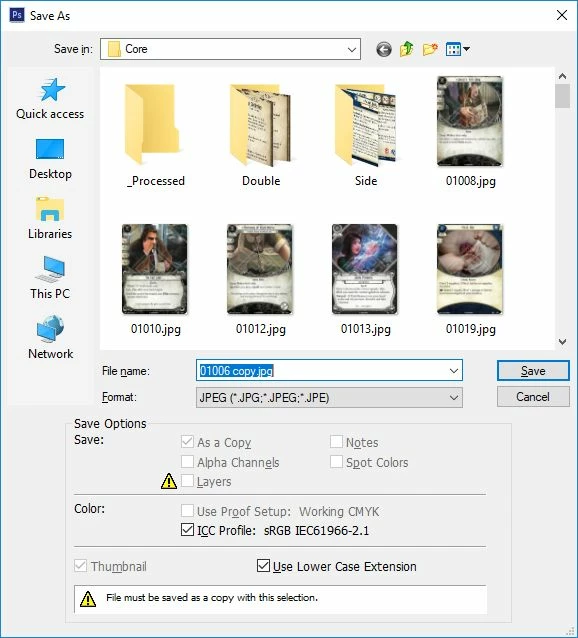
Any ideas what is going on here? I have just installed a new copy of PScs6 as I got a new computer, but I swear I have done a zillion of these kinds of action before and it always took all the files in the folder, did what I asked to them and then saved them into the new folder with the same names as they originally had.

    This topic has been closed for replies.
    Correct answer Jeff Arola

    My guess is something in your action is creating a layer and jpegs can't have layers and that's the reason your getting the Save As dialog? If you look there is a warning triangle next to Layers in the Save As dialog and the reason for the copy being added to the name.

    How are you resizing the image in the action?

    1 reply

    Jeff Arola
    Community Expert
    Jeff ArolaCommunity ExpertCorrect answer
    Community Expert
    August 8, 2017

    My guess is something in your action is creating a layer and jpegs can't have layers and that's the reason your getting the Save As dialog? If you look there is a warning triangle next to Layers in the Save As dialog and the reason for the copy being added to the name.

    How are you resizing the image in the action?

    abUSER23Author
    Inspiring
    August 8, 2017

    ahh.. you know. .I bet that is exactly what it is as some of the PNG files have alphas so they have no background layer.

    I'll add a flatten action to it and see if that works...

    (it dose)