PiercePixels
Participant
January 4, 2019
Question

Photoshop Action in v20.0.1 Not Working Correctly

  • January 4, 2019
  • 3 replies
  • 607 views

My action works just fine in PS v19.1.7 but does not work correctly in v20.0.1

In 20.0.1 the following action stops at the highlighted step <Close> and asks me if I want to Save Changes? 
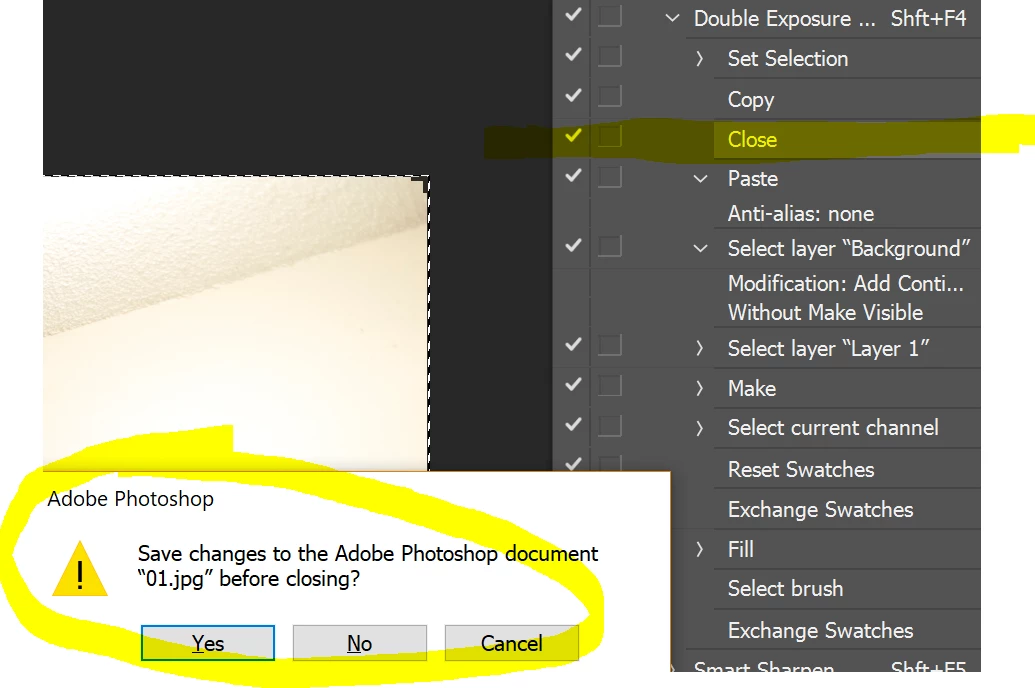
It really disrupts my workflow. 

Can anyone help me with this? What it 20.0.1 asking for this step when the previous version does not? 

Thank you for any help.

    This topic has been closed for replies.

    3 replies

    @mj
    Community Expert
    Community Expert
    January 4, 2019

    If you want to save the changes you need a Save or Save step as part of your action.

    These two resources may be of help.

    Photoshop: Can you please explain "Override Action 'Save As Commands" in Batch dialog? | Photoshop Family Customer Commu…

    Process a batch of Photoshop files

    Good luck

    JohanElzenga
    Community Expert
    Community Expert
    January 4, 2019

    Maybe you use different color management policies. If Photoshop opens a document with a color profile that is different from the working space, the best choice is to keep the embedded color profile (so nothing changes). Then Photoshop will also not ask you to save the changes when you close that document again. That apparently was your setting in Photoshop in the past and so your action could close the document without getting a dialog.

    Maybe you (inadvertently) changed this to 'convert to profile', so the image is now converted to the working space. In that case the image has changed even if you didn't make any edits, and so Photoshop will ask you if you want to save those changes.

    -- Johan W. Elzenga
    PiercePixels
    Participant
    January 4, 2019

    Thanks Johan for the reply, however, the color management policies are identical in each version.

    JohanElzenga
    Community Expert
    Community Expert
    January 4, 2019

    PiercePixels  wrote

    Thanks Johan for the reply, however, the color management policies are identical in each version.

    Well, something makes Photoshop think that the file has changed. That is why you get the dialog.

    -- Johan W. Elzenga
    Bojan Živković11378569
    Community Expert
    Community Expert
    January 4, 2019

    This is normal and expected behavior when something is done in open document what Photoshop count as change because your Close step does not have any instruction inside. If you want to skip dialog then your close step must be recorded like this, for example: Saving: no.

    PiercePixels
    Participant
    January 4, 2019

    Thanks Bojan, but my current action, and many others like it, do not require that step in v19.1.7 or older.