
Known Participant
October 24, 2022
Question

Photoshop Action Running Script Generates Url sometimes?

  • October 24, 2022
  • 2 replies
  • 242 views

Hello, 

I noticed that when I record a script into an action - sometimes it just generates Name: Script Name but sometimes it generates a filepath. Is there a way to always force it to generate a name so that I can transfer them to multiple computers without issues? 

These two examples were recorded exactly the same, and the actions are in the same place. Not sure what is happening.
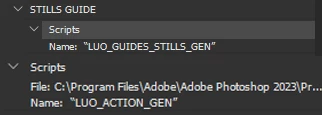


This topic has been closed for replies.

2 replies

Chuck Uebele
Community Expert
Community Expert
October 25, 2022

This is why I try not to combine actions and scripts. More things are likely to break, when doing so.

Stephen Marsh
Community Expert
Community Expert
October 24, 2022

If you use the Browse command, the entire absolute path is recorded.


If you install the script in the presets/scripts directory then only the name is recorded.


https://prepression.blogspot.com/2017/11/downloading-and-installing-adobe-scripts.html#Photoshop

BoluomiAuthor
Known Participant
October 25, 2022

I know 🙂 that's why I am baffled as to why they are different - you can see the filepath in my screenshot leads exactly to the install folder. Is there a different method to run a script than File > Scripts > Run Script?

Stephen Marsh
Community Expert
Community Expert
October 25, 2022

Are we both on the same page here???


To repeat, using File > Scripts > Browse will record the absolute file path + file name.


Installing a script into:

  • /Applications/Adobe Photoshop 202#/Presets/Scripts
  • C:\Program Files\Adobe\Adobe Photoshop 202#\Presets\Scripts


Will make the script available under File > Scripts* and will only record the script name, not the file path into an Action.


* Some scripts can be programmed to appear in other menus, such as Automate or Filter.