
Participant
August 4, 2022
Answered

photoshop action to ignore image of a specified dimension

  • August 4, 2022
  • 1 reply
  • 373 views

I am looking for some tips on how to create a PS action that will work only on images that are larger than 1024 x 1024.  in other words, I don't want to scale up to 1024, only down to 1024 x 1024
This topic has been closed for replies.
Correct answer Bojan Živković11378569

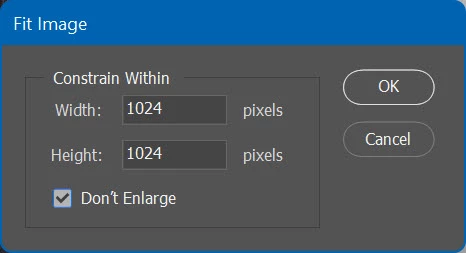
You have option Don't Enlarge in Fit Image so script will skip images smaller then desired dimensions.

1 reply

Stephen Marsh
Community Expert
Community Expert
August 4, 2022

Automate > Fit Image has the option to fit without upsizing and can be recorded into an Action.

Participant
August 4, 2022

thank you for your quick reply.  I am unsure however how that helps my action ignore images of a specific size.   I have a folder full of images of varying sizes 512 to 4k images.  I only want to scale down images that are larger than 1024 x 1024.  smaller images (i.e. the 512 x) are to be skipped by the scaling action and remain at their original dimension.

Bojan Živković11378569
Community Expert
Community Expert
August 4, 2022

You have option Don't Enlarge in Fit Image so script will skip images smaller then desired dimensions.