asbjørne14824494
Participant
May 31, 2017
Answered

Photoshop actions target painted area

  • May 31, 2017
  • 1 reply
  • 1229 views

Hello guys

I've seen a lot of action packs on youtube, most of them target a specific area. They do that by painting the area green, red or some other color.

I want to know how this is done, how do i make an action target only the painted area? i've made actions before and i can't seem to make an action that does that. I've tried searching google and youtube for videos and references on how to do this, but i simply can't find anything so now i have to ask you guys 🙂

What i want is simply an action that targets the painted area, for example the face.

Regards
This topic has been closed for replies.
Correct answer c.pfaffenbichler

You can basically use any Layer, but apparently it is called »Paint selection« here, probably to ensure the subsequent Action picks the correct Layer.

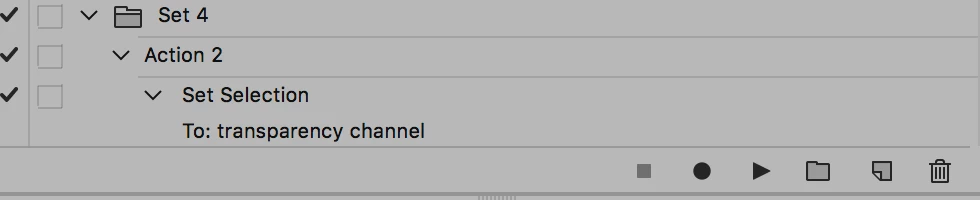
Loading the active Layer’s transparency is recordable (cmd-click the Layer’s icon in the Layers Panel), so the naming may not be necessary as long as the active Layer is the one you painted the region on.

Once the Selection is loaded it can be used as a Layer Mask etc.

1 reply

c.pfaffenbichler
Community Expert
Community Expert
May 31, 2017

Are you talking about Quick Mask Mode or Channels or Layer Masks?

If not what are you talking about  when you say »painted area«? Could you post screenshots to illustrate?

asbjørne14824494
Participant
May 31, 2017

What i'm talking about is that you have a picture, then you make a layer where you paint over the face for example. Then the action only targets the face of the person in the photo.

You see it's like this image

and this

Screenshots taken from here: Face Painting photoshop action - YouTube

I know this may be an incredibly complicated process, but i dont need something this complicated, i just want to know how to make the layer where he paints over the face and then make the action target that selection

c.pfaffenbichler
Community Expert
c.pfaffenbichlerCommunity ExpertCorrect answer
Community Expert
May 31, 2017

You can basically use any Layer, but apparently it is called »Paint selection« here, probably to ensure the subsequent Action picks the correct Layer.

Loading the active Layer’s transparency is recordable (cmd-click the Layer’s icon in the Layers Panel), so the naming may not be necessary as long as the active Layer is the one you painted the region on.

Once the Selection is loaded it can be used as a Layer Mask etc.