Photoshop and Camera Raw
Hello,
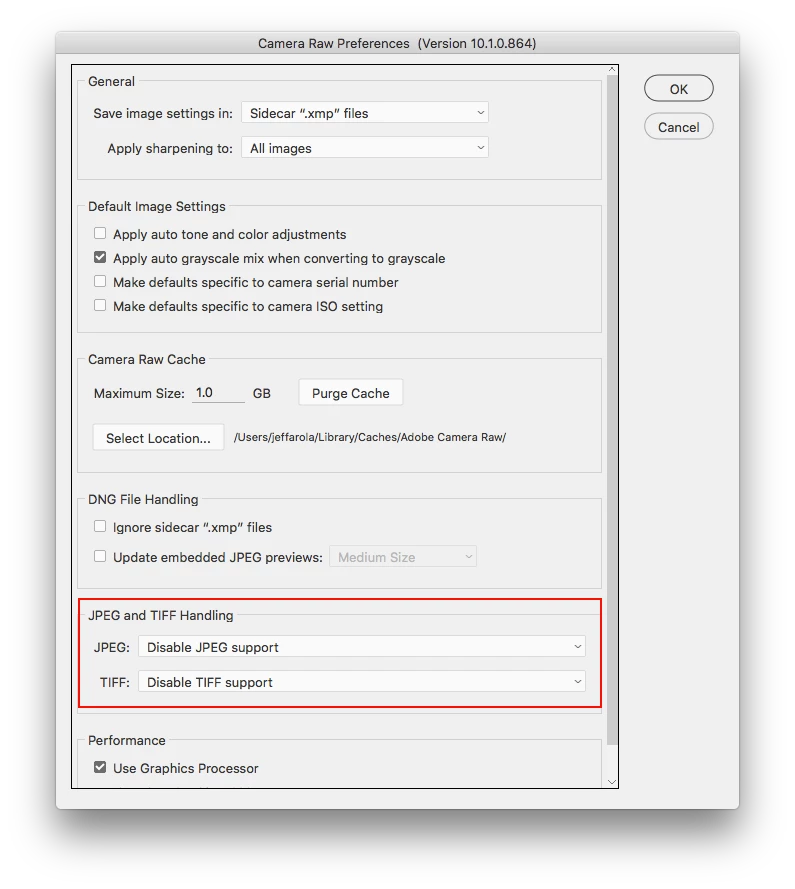
I just starting using the Camera Raw 6.7.1 inside of my Photoshop CS5. Even though I don't have an actual Camera Raw format on my PC, I still can open a JPEG or TIFF inside Camera Raw. For example, click file open as instead of file open and then select the file and Camera Raw format. Everything seems to work great, except I'm having an issue that I need to stop. Any file that I opened in camera raw, now always opens in camera raw just by clicking file open. Where as any file that I never did open in Camera Raw will open regularly inside Photoshop CS5. I can't have this, I need to be able to choose when to open a file in camera raw and when not to inside Photoshop CS5. I looked at the preferences and settings inside Camera Raw and Photoshop CS5 and don't see how to stop this from happening. I don't use my Bridge CS5 and never plan to. Therefore, I'm not looking for a solution that involves Bridge CS5.
Thanks,
Leo
 AdChoices