Beantwortet
Photoshop and LightRoom reducing image quality after JPG export
Photos become darken and less contrast after exported to JPG from both PS and LR (previous and the latest version also). I am using Windows 10.
Photos become darken and less contrast after exported to JPG from both PS and LR (previous and the latest version also). I am using Windows 10.
It's a common misunderstanding in these cases that the file somehow "changes". It doesn't.
The question is whether you are viewing the file in an application that supports icc profiles and color management at all. Many don't, and Windows "Photos" is one of them. iPads aren't color managed under any circumstance. All bets are off here
A properly color managed application like Lightroom or Photoshop will always display the file correctly - provided that you have a valid and healthy monitor profile. That's essential, and this is why people use calibrators. If you don't have a calibrator, this can be a problem. Display and laptop manufacturers distribute their own generic monitor profiles through Windows Update - and these profiles are surprisingly often of poor quality or defective. A non-color managed application doesn't use the monitor profile and will be unaffected.
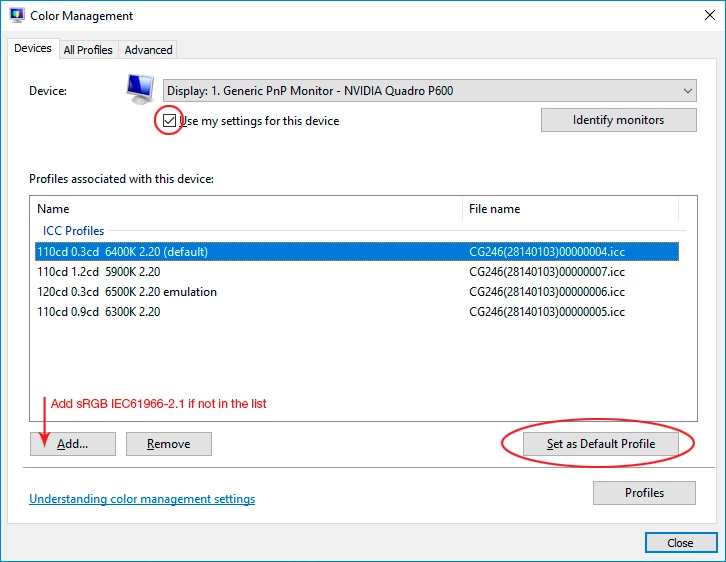
To test whether your monitor profile is basically sound, try to replace it with sRGB IEC61966-2.1. That won't be entirely accurate, but it shouldn't be dramatically off. Relaunch Photoshop when done, it needs to load the profile at startup.
Enter your E-mail address. We'll send you an e-mail with instructions to reset your password.
 AdChoices