
Participant
January 14, 2022
Answered

Photoshop and Windows 11 incompatibility/ Incompatibilidade Photoshop e Windows 11

  • January 14, 2022
  • 6 replies
  • 1559 views

Após uma atualização do software houve incompatibilidade gráfica e no desempenho do programa. 
Meu notebook é um acer nitro 5 com placa gráfica geforce. 

Gostaria que esse problema fosse resolvido logo. Obrigada! 

This topic has been closed for replies.
Correct answer Ged_Traynor

Hi

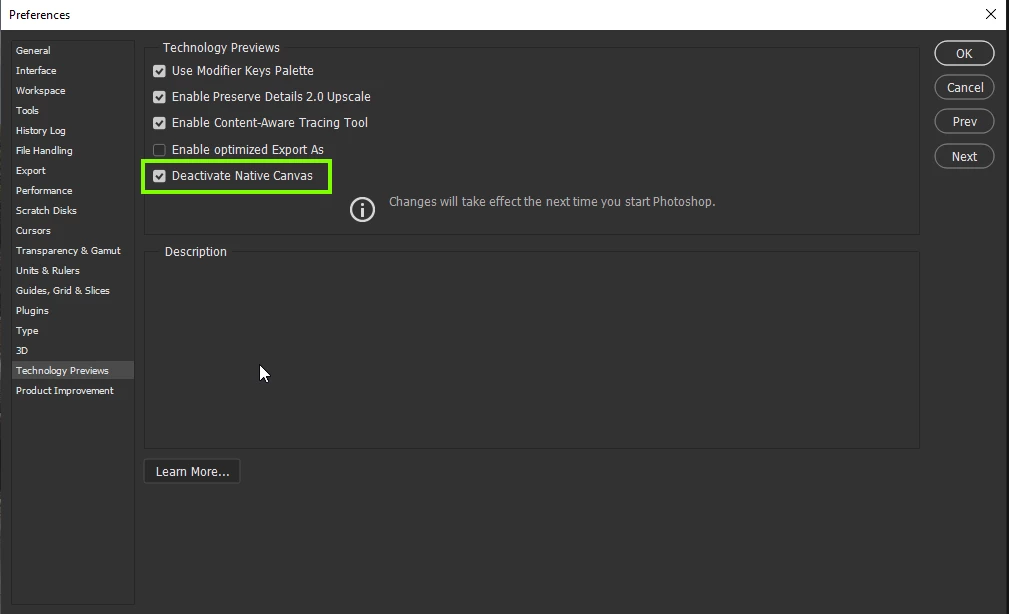
Try enabling this option in preferences and restarting Photoshop to see if it helps
6 replies

TwILeK
Known Participant
December 5, 2022

Hi


I think I have a same issue, PS Win11 and NVidia ...

Photoshop 24.0.1 Windows 11 NVidia GPU lagging - Adobe Support Community - 13392647

davescm
Community Expert
Community Expert
January 14, 2022

That should meet the requirements.

I would next get the latest Studio driver from NVidia which is 472.84. When installing choose Advanced then Clean Install. That will overwrite remnants of the old driver which might cause issues if left behind.


https://www.nvidia.co.uk/Download/Find.aspx?lang=en-uk#


Dave

Participant
January 17, 2022

Hi! I did this process and it really helped a lot!
Normally I used the express installation, I didn't know there was such a difference between them.

davescm
Community Expert
Community Expert
January 17, 2022

In theory it shouldn't make a difference but I've seen issues several times with the express install, where a clean install of the driver resolves them. Hopefully you are up and running now 🙂

Dave

Participant
January 14, 2022

Thank you!!!! That's it

Mark.Dahm
Community Manager
Community Manager
January 14, 2022

@Bruna Moreira Fotografia , The Native Canvas setting is a temporary workaround which would be appropriate if you have an older card that doesn't meeting today's minimum system requirements (2GB VRAM, DX12 level 11 or higher). But your card is not an older card, and you should be using the native canvas for the longer term stability. If you could make sure you have the latest Studio drivers installed (from Jan 2022 as of the time of this note), that may help you get up and running with the Native Canvas enabled.


Let us know if you can work ok or not with the Native Canvas enabled, if you have the chance; thanks!

Participant
January 14, 2022

Hi! GTX 1650

davescm
Community Expert
Community Expert
January 14, 2022

Make sure that :

a. You are using the latest Studio drivers for your GPU (and used Advanced options - clean install when updating)

b. In NVidia control panel >3D settings - make sure that Photoshop is set to use the NVidia GPU and not on board graphics


Which particular NVidia GPU is installed?


Dave

Ged_Traynor
Community Expert
Ged_TraynorCommunity ExpertCorrect answer
Community Expert
January 14, 2022

Hi

Try enabling this option in preferences and restarting Photoshop to see if it helps