gretab16053127
Participating Frequently
February 15, 2022
Answered

Photoshop applying incorrect stroke value to shape

  • February 15, 2022
  • 1 reply
  • 408 views

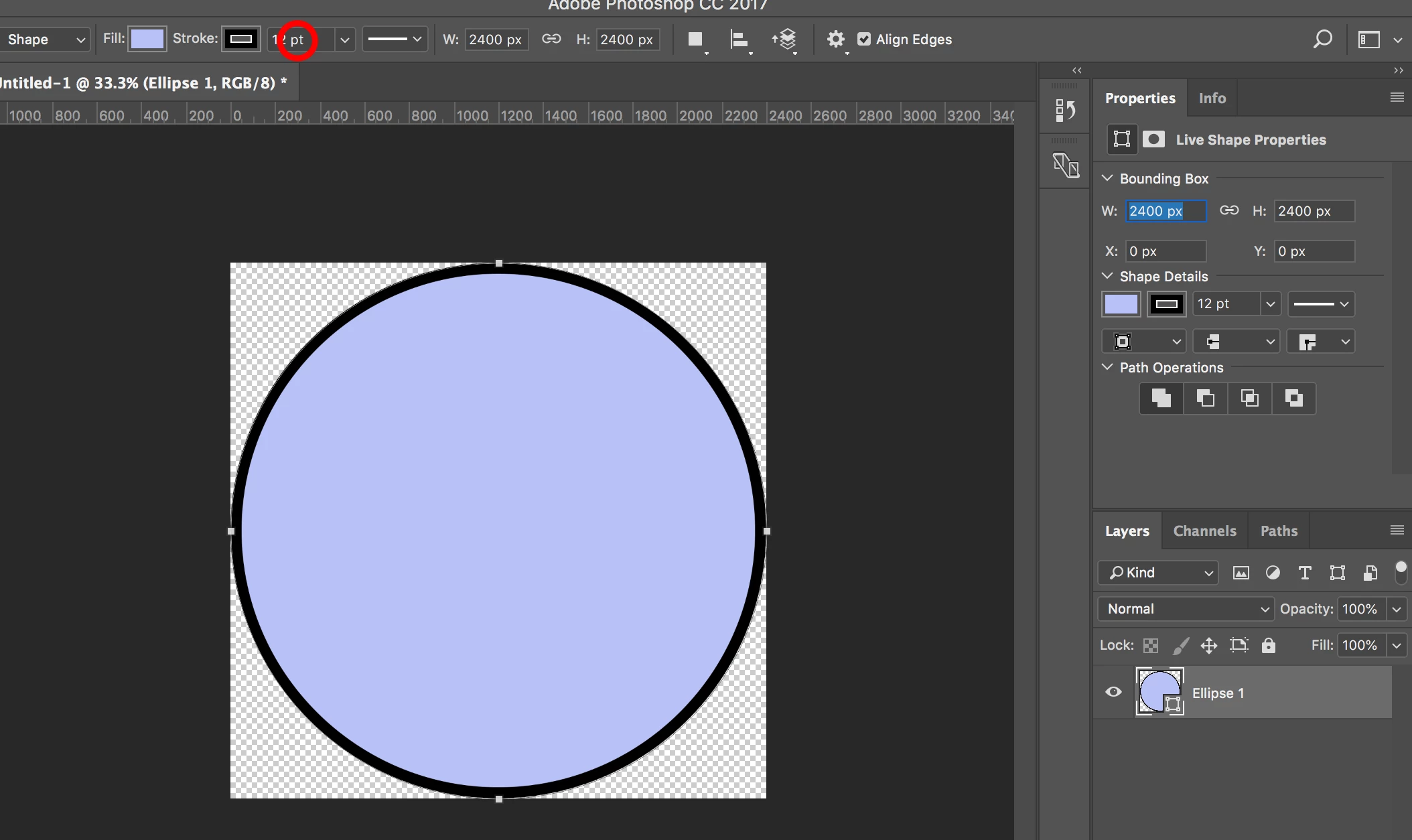
Using Photoshop CC 2017. Trying to apply an inside stroke of 12 pixels to a 2400x2400 circle shape. I've done this with no problem many times before but for some reason today it's applying a 50-pixel stroke (I zoomed in and measured/counted). I'm thinking I must have accidentally reset something somewhere but can't for the life of me figure out what. Screenshot attached. Thanks for any help!
This topic has been closed for replies.
Correct answer c.pfaffenbichler

Apparently you chose 12pt, not 12px. 

1 reply

c.pfaffenbichler
Community Expert
c.pfaffenbichlerCommunity ExpertCorrect answer
Community Expert
February 15, 2022

Apparently you chose 12pt, not 12px. 

gretab16053127
Participating Frequently
February 15, 2022

GAH! So simple but I don't think I would ever have noticed that. Thank you for saving my sanity!!

c.pfaffenbichler
Community Expert
Community Expert
February 16, 2022

At 72ppi 1pt corresponds to 1px, so maybe this file has a different resolution.