
Participant
November 2, 2023
Answered

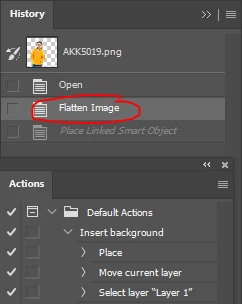
Photoshop automatically flattens transparent images to a white background when using Action

  • November 2, 2023
  • 2 replies
  • 255 views

I am using the Action feature for an image file in png transparent format.
The problem is that Photoshop automatically flattens it into a white background.
Is there any solution? Thank you so much!
 

This topic has been closed for replies.
Correct answer Stephen Marsh

@YODY 


1) Your history steps don’t match the action steps


2) One shouldn't store custom actions in the Default Actions set, as this set can be reset and you would lose your custom action (unless the entire default set is saved to .atn file)


2 replies

Chuck Uebele
Community Expert
Community Expert
November 2, 2023

Rather than using flatten, you should use merge visible. Flatten will always eliminate transparent pixels. 

Stephen Marsh
Community Expert
Stephen MarshCommunity ExpertCorrect answer
Community Expert
November 2, 2023

@YODY 


1) Your history steps don’t match the action steps


2) One shouldn't store custom actions in the Default Actions set, as this set can be reset and you would lose your custom action (unless the entire default set is saved to .atn file)


YODYAuthor
Participant
November 3, 2023

Thank you for your answer.
As you can see in the picture, I did not use the Flatten Image command, but Photoshop added it itself right after opening the image. You can try using any Action on a transparent image file, you will understand the problem I am facing.