Participating Frequently
February 17, 2012
Answered

Photoshop Automation color replacement

  • February 17, 2012
  • 1 reply
  • 8192 views

How would you go about taking a somewhat transparent overlay and replacing the colors of the underlying layers and exporting to many files? I saw how Photoshop has a "Pixel Replacement" feature but you need to supply it with jpgs to swap instead of color codes. I'd prefer just color codes so I wouldn't have to make a ton of images.

If you could point me in the right direction I would appreciate it.

This topic has been closed for replies.
Correct answer c.pfaffenbichler

I am working with Ginostylz on this project. Let me try to put this as best I can:

There are three layers in the photoshop file.

1) Layer 1 sits on top of the other two, and it has a somewhat transparent overlay with some light effects on it on it. This layer gives the colors in the underlying layers the desired effect.

2) Layer 2 is one of two colors we'd like to pull from a CSV file. It can be just a flat color that fills up the whole layer. It has a "hard light" layer mode on it.

3) Layer 3 is the second of two colors we'd like to pull from a CSV file.  It can be just a flat color that fills up the whole layer.

In our research with Adobe's help site entitled "creating data driven graphics", it looks like we have two choices, both of which seem way harder than it could/should be.

1) Option 1: Use the "Pixel Replacement" feature to pull the colors in. To do this, we'd have to create 100,000 images with flat colors and then pull them in

2) Option 2: Use the "Visibility" feature to selectively show/hide layers of different colors. To do this, we'd have to create 100,000 layers with flat colors.

What we'd like to be able to do at this point is to simply replace the RGB of layers 2 and 3 using a CSV file and then export to create many images. Is this possible? If not, how would you go about this?


Edited:

For example:

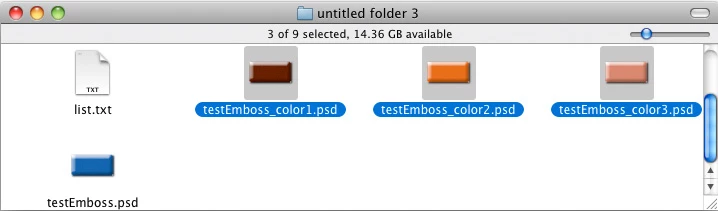
I have a txt-file with this text:

color1;20;30;40;

color2;60;70;80;

color3;60;50;40;

and a file »testEmboss-psd« open and active in Photoshop with a top-level (meaning it is not in a Group) Solid Color Layer with the name »colorLayer«; the Script at the bottom will get me these:

// 2012, use it at your own risk;

// thanks to xbytor;

#target photoshop

if (app.documents.length > 0) {

var myDocument = app.activeDocument;

var documentName = myDocument.name;

var basename = documentName.match(/(.*)\.[^\.]+$/)[1];

// get path;

try {var documentPath = myDocument.path}

catch (e) {var documentPath = "~/Desktop"};

// psd options;

psdOpts = new PhotoshopSaveOptions();

psdOpts.embedColorProfile = true;

psdOpts.alphaChannels = false;

psdOpts.layers = true;

psdOpts.spotColors = true;

// get file;

if ($.os.search(/windows/i) != -1) {var theFile = File.openDialog ("please select files", "*.txt", false)}

else {var theFile = File.openDialog ("please select files", getFiles, false)};

if (theFile) {

var theText = readPref(theFile);

var theArray = theText.split("\n");

//

try {

var theLayer = myDocument.layers.getByName("colorLayer");

// work through list;

for (var m = 0; m < theArray.length; m++) {

var thisText = theArray.split(";");

alert (thisText.join("\n\n"));

var theName = thisText[0];

editSolidFill (thisText[1], thisText[2], thisText[3], theLayer);

// save psd;

myDocument.saveAs((new File(documentPath+"/"+basename+"_"+theName+".psd")),psdOpts,true);

}

}

catch (e) {};

};

};

////// function to change solid fill layers //////

function editSolidFill (theL, theA, theB, theLayer) {

app.activeDocument.activeLayer = theLayer;

          // =======================================================

var idsetd = charIDToTypeID( "setd" );

    var desc3 = new ActionDescriptor();

    var idnull = charIDToTypeID( "null" );

        var ref2 = new ActionReference();

        var idcontentLayer = stringIDToTypeID( "contentLayer" );

        var idOrdn = charIDToTypeID( "Ordn" );

        var idTrgt = charIDToTypeID( "Trgt" );

        ref2.putEnumerated( idcontentLayer, idOrdn, idTrgt );

    desc3.putReference( idnull, ref2 );

    var idT = charIDToTypeID( "T   " );

        var desc4 = new ActionDescriptor();

        var idClr = charIDToTypeID( "Clr " );

            var desc5 = new ActionDescriptor();

            var idLmnc = charIDToTypeID( "Lmnc" );

            desc5.putDouble( idLmnc, theL );

            var idA = charIDToTypeID( "A   " );

            desc5.putDouble( idA, theA );

            var idB = charIDToTypeID( "B   " );

            desc5.putDouble( idB, theB );

        var idLbCl = charIDToTypeID( "LbCl" );

        desc4.putObject( idClr, idLbCl, desc5 );

    var idsolidColorLayer = stringIDToTypeID( "solidColorLayer" );

    desc3.putObject( idT, idsolidColorLayer, desc4 );

executeAction( idsetd, desc3, DialogModes.NO );

};

////// read prefs file //////

function readPref (thePath) {

  if (File(thePath).exists == true) {

    var file = File(thePath);

    file.open("r");

    file.encoding= 'BINARY';

    var theText = new String;

    for (var m = 0; m < file.length; m ++) {

      theText = theText.concat(file.readch());

      };

    file.close();

    return String(theText)

    }

  };

////// get psds, tifs and jpgs from files //////

function getFiles (theFile) {

    if (theFile.name.match(/\.(txt)$/i)) {

        return true

        };

          };
1 reply

c.pfaffenbichler
Community Expert
Community Expert
February 18, 2012

Could you please post screenshots/mock-ups to illustrate what you are trying to achieve.

ginostylzAuthor
Participating Frequently
February 19, 2012

I have about 50,000 to make in different paint sample colors. Some are metallic or pearl paint swatches, while others are solid.  I may need some bevel and emboss, or some type of highlight too, but this is the best I had on my home computer.

c.pfaffenbichler
Community Expert
Community Expert
February 20, 2012

I think you are not giving enough detail for us to provide sensible advice.

What is the source, what is the result supposed to be (including Layer structure, transparencies, file formats), what is the data on which the changes are supposed to be based, …?