
Participant
March 28, 2022
Answered

Photoshop breaks text order with spaces in between

  • March 28, 2022
  • 3 replies
  • 936 views

Whenever I try to write a UK postcode with specific format, Photoshop scrambles the order. For example, if I type W11 3ES, Photoshop changes it to W3 11ES. It’s the same whether I type the postcode or I paste it from the clipboard.


Interestingly, some postcodes are fine. For example, W1J 5QN doesn’t get scrambled.


The problem is repeatable whenever there is a space between numbers (11 and 3 in the problematic example). The OK example has a letter and a number between the space (J and 5).


I am using the latest version (23.2.2) of Photoshop on a Windows 10 Pro with United Kingdom locality.
This topic has been closed for replies.
Correct answer ktaki

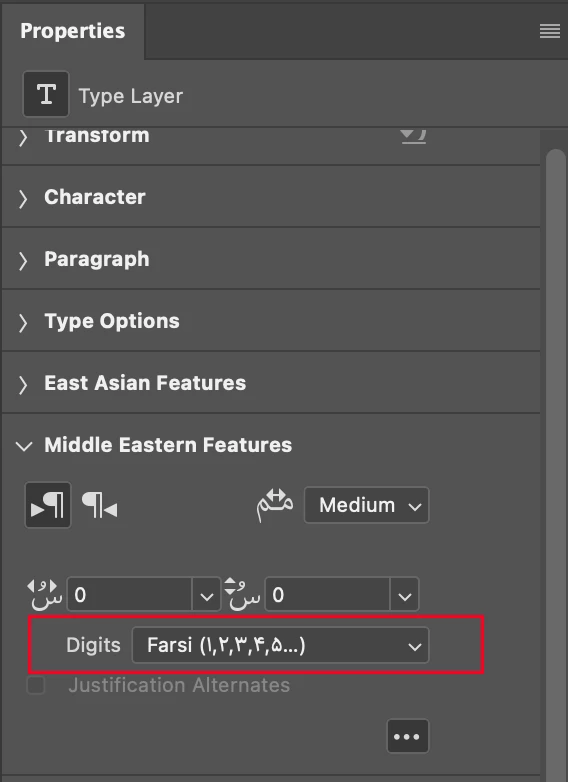
Can you check the Digits setting in the "Middle Eastern Features" section of the Type Layer Properties panel?

1. Select the Type layer in the Layers panel.

2. Open the Properties panel.

3. Scroll down to the Middle Eastern Features section.

4. Open the section and expand it further by clicking ... icon.

5. Check the Digits setting.

Does it say "Farsi..."? 

If it does, set it to "LTR Arabic", then try typing.

3 replies

ktakiCorrect answer
Adobe Employee
April 7, 2022

Can you check the Digits setting in the "Middle Eastern Features" section of the Type Layer Properties panel?

1. Select the Type layer in the Layers panel.

2. Open the Properties panel.

3. Scroll down to the Middle Eastern Features section.

4. Open the section and expand it further by clicking ... icon.

5. Check the Digits setting.

Does it say "Farsi..."? 

If it does, set it to "LTR Arabic", then try typing.

Participant
April 28, 2022

Thank you very much ktaki. It was set to (Hindi) but got fixed once I changed it to LTR Arabic as you have suggestes. Cheers mate.

Participant
March 28, 2022

It's about typing text (in a text layer) in Photoshop.

melissapiccone
Community Expert
Community Expert
March 28, 2022

I'm confused, are talking about trying to register your software or actually typing it in a document in Photoshop?

Melissa Piccone | Adobe Trainer | Online Courses Author | Fine Artist