Participant
December 6, 2019
Question

Photoshop Brush behaves like multiply but is set to normal

  • December 6, 2019
  • 2 replies
  • 2452 views

Hi!

Ive spent over 5 hours trying to solve this

I have my layer settings on normal
Bursh setting on normal
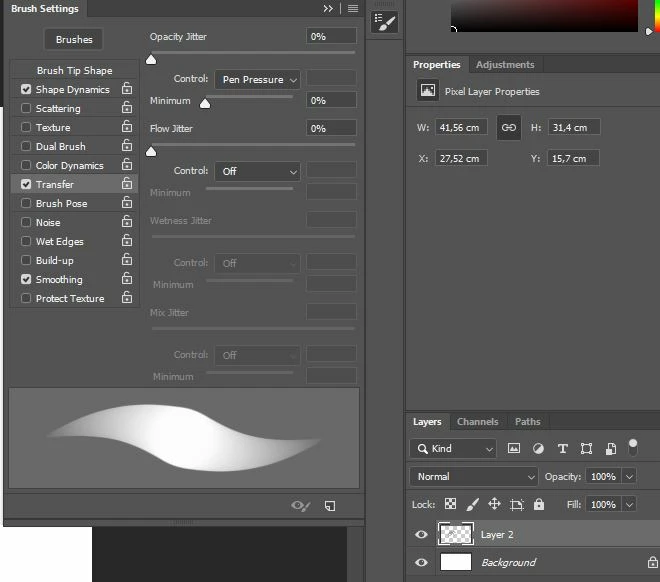
What I am using is brush transfer
Opacity - Pen pressure
and
Shape dynamics - pen pressure

Why does it behave like multiply when I paint?
I put down a stroke, and the next stroke if it comes on top of the old one it acts like multiply.


 

2 replies

Chuck Uebele
Community Expert
Community Expert
December 7, 2019

What's your base color? If your opacity is set to pen pressure, then you might not be getting full opacity, and it's building up, looking like multiply.

PhrawztAuthor
Participant
December 7, 2019

Base color is pretty much black. I just wish there would not be any build up using the opacity.
Lets say i pick black as color.
I paint with 50% pressure and grey comes out.
If i draw another line with 50% pressure on that it becomes black.

I just wish the both grey lines i drew would act like two grey lines and not like two black lines with 50% opacity.

But I guess that might just be how it works. I just dont understand what settings people paint with, because i kinda need to opacity to mix? or do I use something else maybe

Chuck Uebele
Community Expert
Community Expert
December 7, 2019

That's how it works, and is suppose to work. If you want to mix colors, use the mixer brush. The opacity is to allow you to gradually build up density to the base color. 

PhrawztAuthor
Participant
December 6, 2019

Brush blend mode doesnt seem to work at all,. I have reinstalled photoshop, and reset settings.
If this is how opacity is supposed to behave then there must be another way.
If i put two light grey strokes on top of each other then I dont want it turning black. Painting light gray on light gray doesnt make it black wtf

Kevin Stohlmeyer
Community Expert
Community Expert
December 6, 2019

Try turning off Transfer.