
Photoshop brush not working!
Hello everyone!
This is my first time posting here. I hope I make sense and hopefully someone can help me resolve this annoying issue!
I have been having this issue for a while now and it has become very troublesome to paint on Photoshop.
It's hard to explain since I cannot revert to the brushes original application, but hopefully these images will be helpful.
This is how the brush should look when applied (first image).
It's supposed to be textured, but right now it's more opaque and "pixelated" (second image).
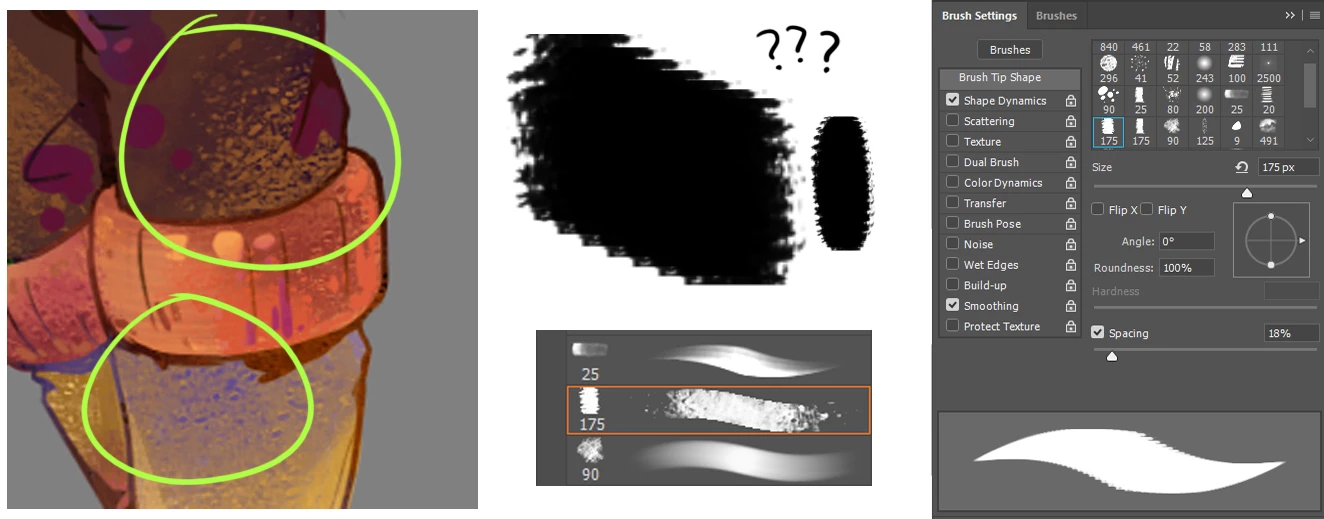
I made sure to uncheck the "Always use pressure" buttons and all my settings are normal.
I even reset the tools and restarted my computer and photoshop.
I also went into services and restarted the Wacom settings.
I'm not sure whether this is a problem with my tablet, or photoshop?
I have the latest drivers and recently updated everything tablet related so it should be okay.
I've tried resetting the brushes and re-uploading my set of brushes back, but they re-appear with the wrong settings, even though the brush thumbnail is correctly shown.
Any advice and help is much appreciated!
Thank you!
 AdChoices