Participant
January 23, 2017
Answered

Photoshop brushes panel

  • January 23, 2017
  • 2 replies
  • 816 views

I've jumped from CS5 to CC and the one thing I find exhausting is the brushes panel. After years of flipping open the brushes panel and choosing what I want, now I have to "make" a brush every time I want to use one. Sure, it only takes a few seconds, but it's over and over as I adjust size and hardness. They're not lined up by size or hardness, either, so whatever I've used before is still just hanging out there.

Isn't there any way to have the precreated set of brushes available to me? I know I can make and save as presets, but I'm wondering if there's something already available.
This topic has been closed for replies.
Correct answer

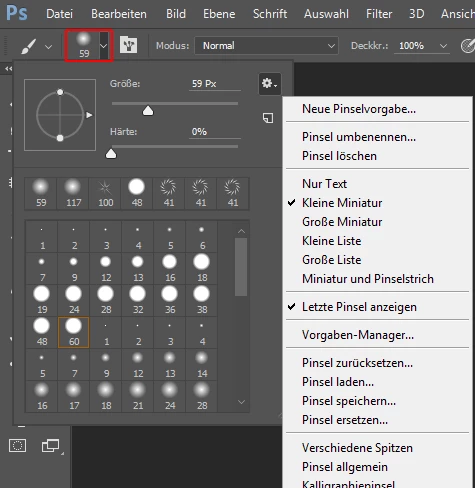
In addition to the big brushes panel you can use the old  familiar brushes panel just above the tools panel.

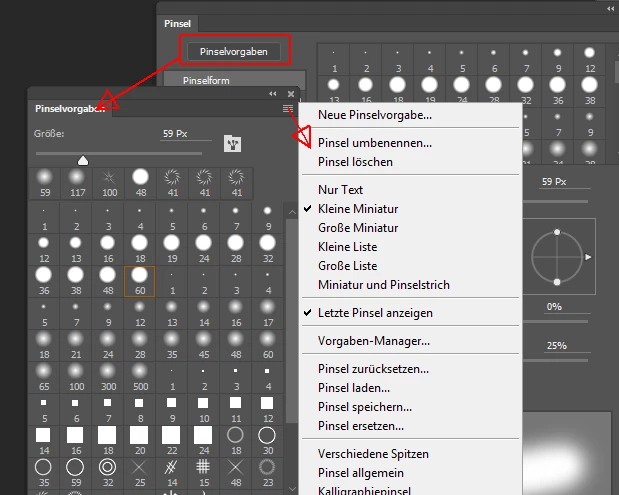
Or the brush presets panel which is nearly the same:

Fenja

2 replies

Trevor.Dennis
Community Expert
Community Expert
January 24, 2017

You can adjust brush size and hardness via Alt right click and drag, but have a look at BrushBox.  I have been using it since it was released a month or two ago, and it has made a significant improvement to my use of brushes.  It is super easy to save new presets, and just as easy to save and mix tool presets with brush presets in the same panel.  I love it!

https://gumroad.com/l/brushbox

Correct answer
January 23, 2017

In addition to the big brushes panel you can use the old  familiar brushes panel just above the tools panel.

Or the brush presets panel which is nearly the same:

Fenja