Participant
October 21, 2022
Answered

Photoshop bug

  • October 21, 2022
  • 2 replies
  • 206 views

During operation, Photoshop is very buggy, it heavily loads the processor. Other programs work great. How can this be fixed?

This topic has been closed for replies.
Correct answer Ged_Traynor

Hi

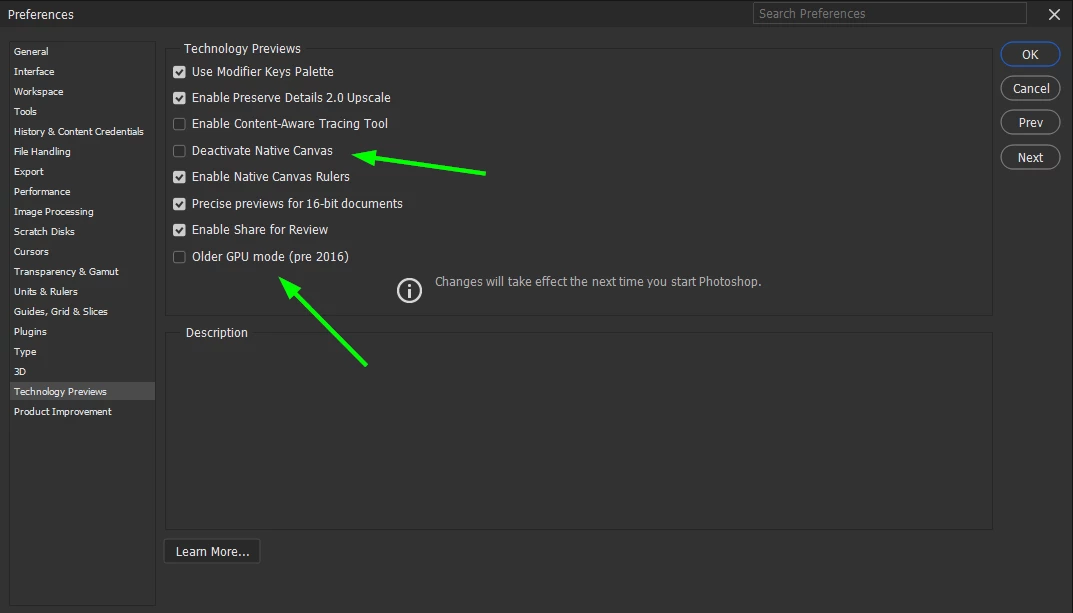
Try enabling "Deactivate Native Canvas" in preferences and restarting Photoshop to see if it helps, if that doesn't help try enabling "Older GPU Mode (pre2016) again restart Photoshop
2 replies

Participant
October 21, 2022

Thanks a lot for your answer. The deactivation setting helped immediately.

Ged_Traynor
Community Expert
Ged_TraynorCommunity ExpertCorrect answer
Community Expert
October 21, 2022

Hi

Try enabling "Deactivate Native Canvas" in preferences and restarting Photoshop to see if it helps, if that doesn't help try enabling "Older GPU Mode (pre2016) again restart Photoshop