
gener7
Community Expert
Community Expert
September 9, 2013
Answered

Photoshop CC 14.1 GPU not detected (MacOS)

  • September 9, 2013
  • 13 replies
  • 38582 views

So I upgraded to Photoshop CC 14.1  Mid 2009 Macbook, 10.8.4 6GB ram/NVDIA 9400M GPU 236 MB ram.

When I launch PS by itself, my GPU is detected. If I double click on a file, there is a delay in opening and I get this message:
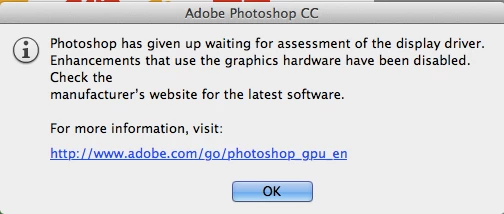
All my OpenGL functions are disabled. So now what can be done to get my GPU working as it did in 14.0?

I'll guess I'm out of luck since NVDIA doesn't issue updated drivers for my GPU.

Just tell me what logfiles you need and how I can get them for you. I'm thinking maybe 14.1 is too much for this system and I'll have to dial back if this is not a bug.

Gene

    This topic has been closed for replies.
    Correct answer Adam Jerugim

    We have a workaround that should get the GPU working again with 14.1 on affected Mac systems...

    1.  Navigate to the folder where the application is installed <OS Volume>\Applications\Adobe Photoshop CC\

    2.  select the Adobe Photoshop CC application and right-click or control click on it - then select Show Package Contents from the menu options

    3.  Navigate to the following location (within the app package):  Contents\MacOS\

    4.  in that folder you should see something called sniffer - rename that by simply adding a '~' at the begginning of the file name

    Do not delete this file.  You'll likely need to remove the '~' in the future in order for future updates to work for 14.x.

    We'll make sure this gets properly fixed soon.

    Thanks,

    Adam

    13 replies

    Participating Frequently
    September 9, 2013

    I'm having this same problem.

    I asked adobe about it, and they told me I had to contact Apple to get help with re-installing my driver. I insisted it was a problem with 14.1 specifically, since 14.0 worked just fine, but they prevailed and I contacted Apple.

    Apple had me try out a few things, but in the end they said it's probably a problem on Adobe's part. So now here I am.

    Same specs as DehGeh.

    qaesar wrote:

    How do i rollback to 14.0, uninstall and reinstall ? Or will it reinstall 14.1 again (latest) ?

    In other words, does the cloud install the 14.0 by default  or the latest (14.1) ?

    I tried uninstalling and reinstalling Photshop from Creative Cloud, and got version 14.0. But then I updated to 14.1 to see if the problem occured again, and it did.

    Hoping to see a solution to this, as using Photoshop is really sluggish when it's not using the proper GPU.

    Participating Frequently
    September 9, 2013

    This section of the help documentation does state that my GPU is not officially testet and supported by Adobe, but I don't think it should just give up using it at all.

    © Si
    Inspiring
    September 9, 2013

    Exact Same Problem.

    We're all paying beta testers yet again!!

    SORT IT OUT ADOBE !!

    Participating Frequently
    September 9, 2013

    Same problem here, I'm DESPERATE !!! Before the Update it worked flawless, never had a problem.

    Nvidia 680 GTX Mac Edition !!!

    I NEEEED the GPU badly because i work with a Wacom multitouch tablet and i need to rotate the view with my fingers FAST...

    Adobe, please HELP!

    Is there ANY configuration file to force the GPU ? Like the cards.txt file in Premiere or AfterFX ?

    Mountain Lion 10.8.4, CUDA driver latest, Mac Pro

    gener7
    Community Expert
    gener7Community ExpertAuthor
    Community Expert
    September 9, 2013

    I had thought my GPU was borderline and the .1 update pushed it over the edge,so I'm in the process of dialing back to 14.0 for now.

    An NVDIA 680GTX is more advanced than what I have. I'm surprised the sniffer failed on that.

    Gene

    Trevor.Dennis
    Community Expert
    Community Expert
    September 9, 2013

    OH dear.  Several similar reports already.  Has anyone had a problem free upgrade to 14.1? If so, what sort of hardware configuration?