
arvsol
Participating Frequently
August 18, 2018
Question

Photoshop CC 19.1.5 - Brand new iMacPro 14 Core - Slow response

  • August 18, 2018
  • 5 replies
  • 929 views

I have a brand new iMac Pro 14 core 32, gb ram. AMD Radeon Pro Vega 64 graphics card.

My problem is that photoshop is freezing for 2 - 20 seconds every time i zoom inn / out, hiding / unhiding layers.

This offcourse makes me unable to do anything in photoshop since its all about waiting..

The PSD i am working on is a 6389 x 4116px comp of different 3d, and photo layers in 16 bit. I have 21 layers and 3 groups.

I also tried to downgrade the document to 8 bit, still the same issue.

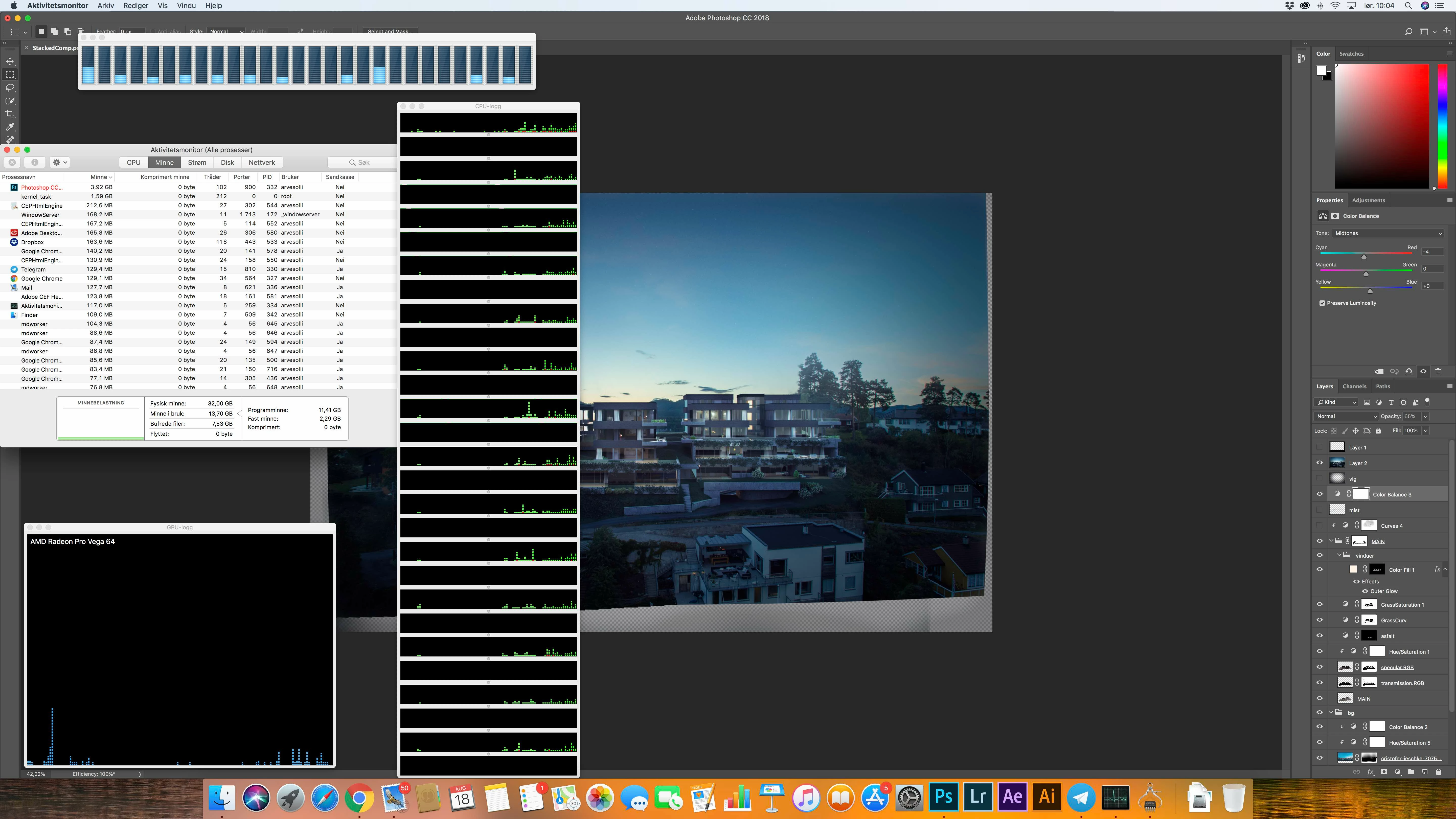
I am watching the CPU, RAM and GPU while photoshop freezes but it is never near using more than 20% of its avilable recources.

Please see atteched screenshot taken right after a freeze. In the CPU and GPU history window you can see the activity of several freezes the last 5 minutes.
This topic has been closed for replies.

5 replies

Participating Frequently
February 4, 2019

the crashes have declined, but the slowness continues.

10 minutes to open a 20mb file....

arvsol
arvsolAuthor
Participating Frequently
August 18, 2018

Hi, i downloaded a software called Affinity Photo (that looks like a competitor to photoshop.) and opened the exact same PSD 16-bit RGBA file, and everything was floating smooth. Booth zooming and hiding / unhiding layers. It is superfast response and i can see that it utilizes all available CPU power. (where photoshop stoped at 10 - 20%)

What could be the problem?

Peru Bob
Community Expert
Community Expert
August 18, 2018

arvsol  wrote

What could be the problem?

You may need to use the Adobe Cleaner Tool:

Use the Creative Cloud Cleaner Tool to solve installation problems

Derek Cross
Community Expert
Community Expert
August 18, 2018

The OP refuses to use it!

arvsol
arvsolAuthor
Participating Frequently
August 18, 2018

I have tried uninstall and reinstall both 18 and also ps2017.

About the creative cloud cleaner tool, i cant see why this should work. My computer is brand new out of the box yesterday. This file was the first thing i opened on this computer and the slow response was there from the first second.

Derek Cross
Community Expert
Community Expert
August 18, 2018

Your choice.

Mohit Goyal
Community Manager
Community Manager
August 18, 2018

Hi arvsol,

We're really sorry for all the hassle. Could you please change the Drawing Mode to Basic settings from the Photoshop > Preferences > Performance tab > Advance Setting > Change the Drawing Mode to Basic > Restart Photoshop.

If the above step doesn't help then, turn off the Graphics Processor from the Photoshop preferences and check if that helps.

Regards,

Mohit

arvsol
arvsolAuthor
Participating Frequently
August 18, 2018

Hi and thanks for your reply. Your two suggestions does not help. Unfortunately.

It tried downscaling the PSD to 1500 px wide. Just for troubleshooting. That helped, but is not a solution for me.

I have worked with 5-6k px wide several times before without any problem.

My biggest concern is that when photoshop freezes, there is not any struggle for either CPU, GPU and RAM. They all have a lot of recources avilable.

Derek Cross
Community Expert
Community Expert
August 18, 2018

Have you tried any of my suggestions?

Derek Cross
Community Expert
Community Expert
August 18, 2018

Try resetting your preferences which you can find under the General tab in Photoshop preferences.

Also see if unticking Use Graphics Processor found under the Performance tab helps.

If those things don't work, uninstall Photoshop using the drop-down menu in the Creative Cloud app, if after reinstalling you still have issues, uninstall the application again and run Adobe Cleaner before reinstalling. Use the Creative Cloud Cleaner Tool to solve installation problems

Let us know how you get on!