
Inspiring
September 18, 2017
Answered

Photoshop CC 2017 lost the dock after windows 10 update

  • September 18, 2017
  • 1 reply
  • 558 views

The panels are all there, but they no longer lock onto the right side of the window as they used to. (Wasn't that called the "dock"?) This problem started when Microsoft did the latest upgrade to Windows 10
    This topic has been closed for replies.
    Correct answer davescm

    Hi try this:

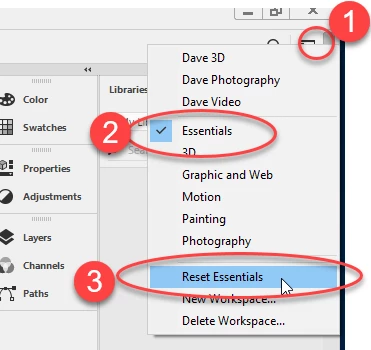
    Go to the top right of your screen and click on the small down arrow. Pick your workspace (Essentials is the workspace that Photoshop opens with from new) then click Reset workspace

    ​Dave

    1 reply

    davescm
    Community Expert
    davescmCommunity ExpertCorrect answer
    Community Expert
    September 18, 2017

    Hi try this:

    Go to the top right of your screen and click on the small down arrow. Pick your workspace (Essentials is the workspace that Photoshop opens with from new) then click Reset workspace

    ​Dave

    Dr.comAuthor
    Inspiring
    September 18, 2017

    Thank you. I use workspace "photography" and indeed, clicking the reset puts the panels back in the dock