Inspiring
February 24, 2017
Answered

Photoshop CC 2017 missing spot healing brush

  • February 24, 2017
  • 3 replies
  • 37811 views

In my toolbox I find a bandaid icon which is only for the healing brush.  I can't find the spot healing brush.  Where it it?

Mary Lou

This topic has been closed for replies.
Correct answer davescm

Click and hold on the healing brush and the other options in the same toolbar location will become visible
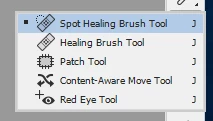
If spot healing is still not in that list right-click on the 3 dots and open up the toolbar customize menu. Ensure the spot healing brush is dragged into that group.

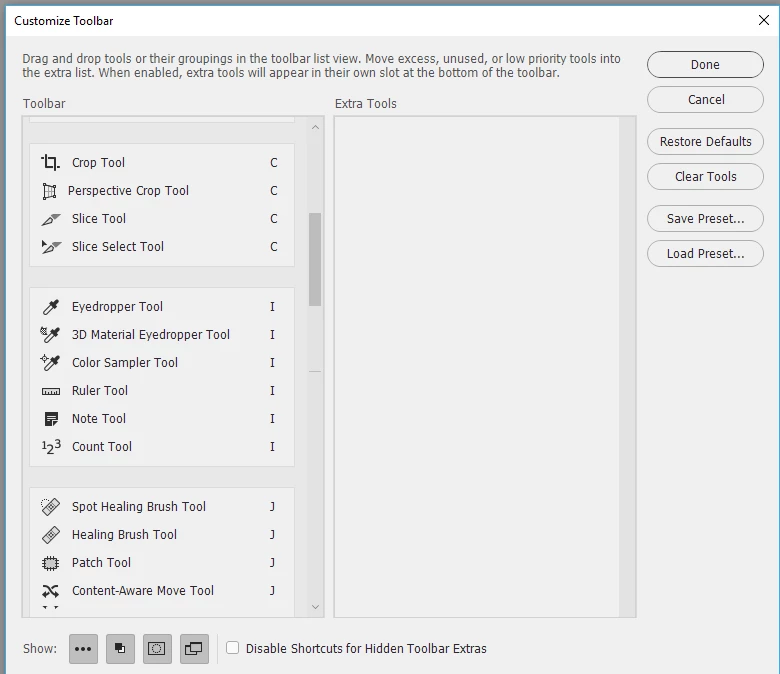
Dave

3 replies

Participant
October 12, 2020

I can't find the 3 dots or the spot healing brush .... help

jane-e
Community Expert
Community Expert
October 12, 2020

Hi @vinomoni 

What version of Photoshop do you have? If you have a newer version of PS, you can also go to Edit > Toolbar.

~ Jane

Participant
October 15, 2020

thanks I fond it there

Inspiring
February 28, 2017

Thanks.  I found the spot healing brush when I followed your directions to edit the toolbox.  I don't know how it left the toolbox but ow I know how to get it back!

Mary Lou

davescm
Community Expert
davescmCommunity ExpertCorrect answer
Community Expert
February 25, 2017

Click and hold on the healing brush and the other options in the same toolbar location will become visible

If spot healing is still not in that list right-click on the 3 dots and open up the toolbar customize menu. Ensure the spot healing brush is dragged into that group.

Dave

ElizabethGailLittle
Inspiring
July 15, 2017

I also found my missing spot healing brush with your directions.  How can I get it to appear on the toolbar?  Also, when I use the instructions to customize the toolbar, absolutely nothing happens!  Not after I click Done, not after I restart PS, never!  What am I doing wrong?  I'm using your excellent tutorial and sometimes having trouble matching my options with yours.

Gail

davescm
Community Expert
Community Expert
July 15, 2017

Hi Elizabeth - try resetting the toolbar.

Go to the three dots and right click

In the menu that opens click on "Restore Defaults" - then Click "Done"

Dave