Participating Frequently
November 4, 2016
Answered

Photoshop CC 2017: New document dialog – no templates

  • November 4, 2016
  • 3 replies
  • 3515 views

Hi,

I think there is a problem with the german version of Photoshop CC 2017 on Windows 10.

When I open the new 'new document' dialog I only can see size presets but no other presets/templates.
In international photoshop versions I saw a button called "View all presets". This button
is missing in the german version. It looks like that:
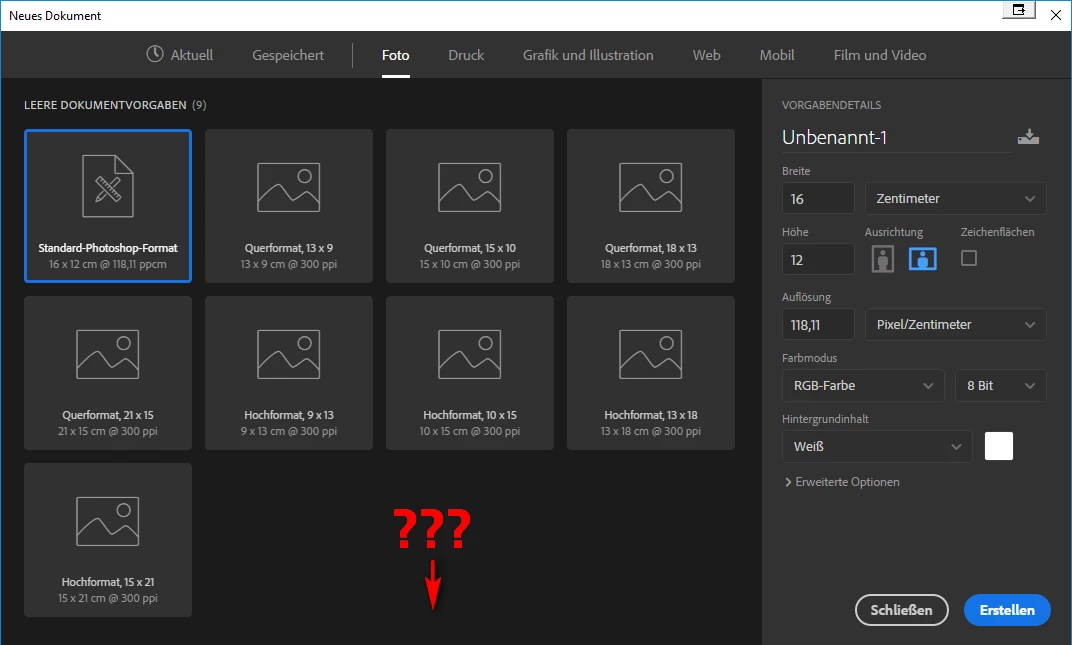
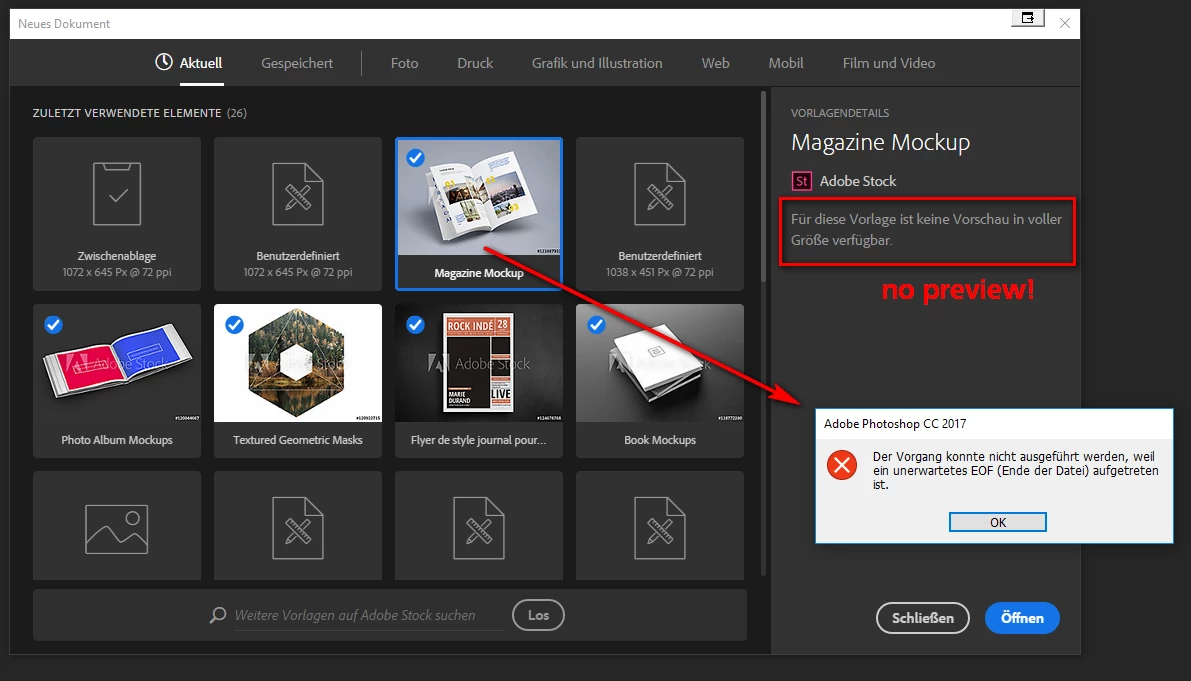
I also noticed, that I only can search for templates in a web browser. Why are no results shown in the dialog. And after I downloaded a template
an wanted to use it I got the message "Der Vorgang konnte nicht ausgeführt werden, weil ein unerwartetes EOF (Ende der Datei/End of File) aufgetreten ist".
Thanks for your response/helping

This topic has been closed for replies.
Correct answer Mark VerMurlen

There is a background process called "CCXProcess" that is responsible for downloading and caching the list of templates that the New Document dialog then reads and displays in the dialog box.  This process is normally started by the Creative Cloud application.  Have you configured your system so that the Creative Cloud application doesn't run?  If so, please allow it to run and reboot your system and see if that solves the problem.  You might need to bring up the New Document dialog a couple of times for it to trigger the download to happen and allow a few seconds to retrieve the data.  If you haven't disabled the Creative Cloud application, then you should be able to bring up the Task Manager and see that the "CCXProcess" task is actually running.  If all that looks fine but you still don't see any templates, then the next thing to check is if there could be some network firewall or other security setting in place that blocks access to the Adobe Stock server.  Can you say more about your network environment?

3 replies

PaulEkert
Known Participant
November 30, 2016

Nope, nothing doing Jon. Rebooted the computer, had a look in my firewall to see if CCXProcess was being blocked, but in fact there is no mention of it there, still no templates.

I think Adobe have a problem here!

JonGoldphone
Inspiring
November 30, 2016

I know Paul, it is a frustrating problem. My CCXProcess is showing in Task manager, but at 0%. Everything else is working fine. On my Windows 10 laptop I have been having the Creative Cloud Sign Out Issue, and then it keeps signing me out even when I've signed in. I have tried to trouble shoot but this happens from time to time more frequently now. until I have to shut down and power up again then it signs in as normal. The template issue is frustrating because at the moment I/we do not have the full service in relation to the PS update.

MartinVAuthor
Participating Frequently
November 4, 2016

Thanks Mark, this solved the problem. I rebooted my system and now it works.

Sorry, my fault. I should have known better. Sometimes the solution is: just to pull the plug.

Regards, Martin

Mark VerMurlenCorrect answer
Adobe Employee
November 4, 2016

There is a background process called "CCXProcess" that is responsible for downloading and caching the list of templates that the New Document dialog then reads and displays in the dialog box.  This process is normally started by the Creative Cloud application.  Have you configured your system so that the Creative Cloud application doesn't run?  If so, please allow it to run and reboot your system and see if that solves the problem.  You might need to bring up the New Document dialog a couple of times for it to trigger the download to happen and allow a few seconds to retrieve the data.  If you haven't disabled the Creative Cloud application, then you should be able to bring up the Task Manager and see that the "CCXProcess" task is actually running.  If all that looks fine but you still don't see any templates, then the next thing to check is if there could be some network firewall or other security setting in place that blocks access to the Adobe Stock server.  Can you say more about your network environment?

JonGoldphone
Inspiring
November 21, 2016

I am having the same problem. No templates showing only the presets. Everything is running ok including the "CCXProcess" . My Creative Cloud application runs from start up but no templates on launch of Photoshop. Frustrating.

PaulEkert
Known Participant
November 27, 2016

Same thing here. Everything loads fine but no sign of templates in the create new screen.

UK version of PS used.