Answered
Photoshop CC 2018 cannot open up, error code 0xc000007b
I've just upgraded my PS CC 2017 to the latest version of CC 2018. Unfortunately, the software couldn't open up and run normally. There was only an error message, which said “The application cannot start properly(0xc000007b), Click OK to close the application”. The screenshot is showed below.
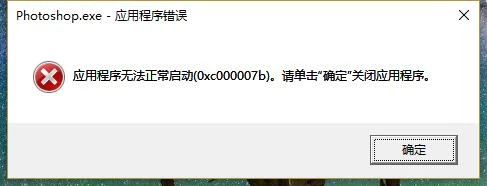
Furthermore, before this issue, it had another 2 errors of lacking 2 files, which are "msvcr120.dll" & "msvcp120.dll". I've downloaded these 2 files and copied them into the System32 Folder, but the issue still exists.
So, what should I do? How can I solve this problem. Is there anyone can provide any solution?
 AdChoices