kimm2052433
Participant
December 15, 2018
Answered

photoshop cc 2018 deleted

  • December 15, 2018
  • 3 replies
  • 585 views

Photoshop cc 2019 bridge does not open tiff file in Photoshop after deleting photoshop cc 2018.
I do not know what the problem is.
    This topic has been closed for replies.
    Correct answer Chuck Uebele

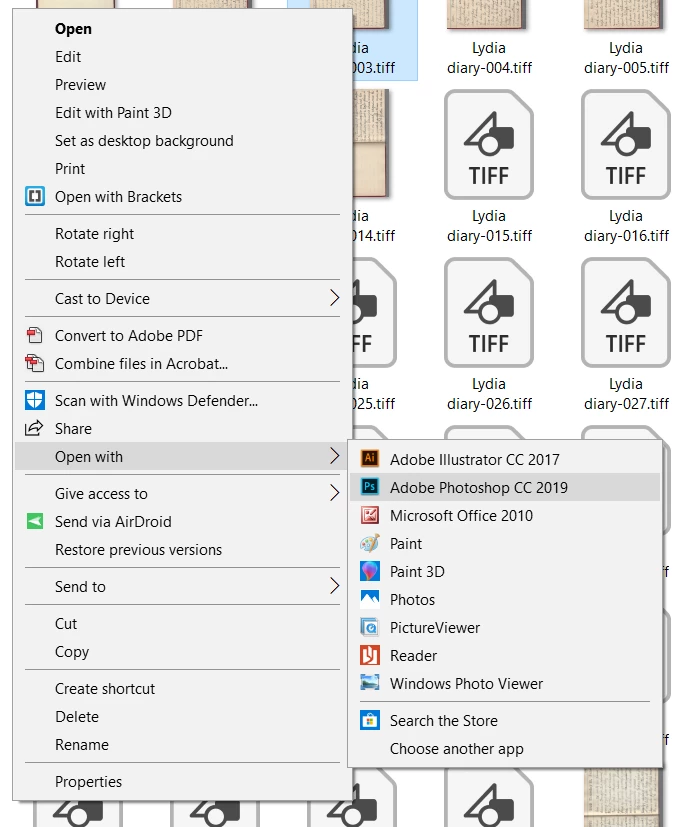
    If you don't see 2019 like in my screen shot, use "Choose another app, and navigate to PS 2019 in the program file folder.

    3 replies

    Chuck Uebele
    Community Expert
    Community Expert
    December 15, 2018

    Can you post a screen shot of what you see?

    kimm2052433
    Participant
    December 15, 2018

    Thank you

    After deleting photoshop 2019, I installed it and it is normal.

    Thank you for your kindness.

    Daniel E Lane
    Inspiring
    December 15, 2018

    Have you opened CC 2019 all the way yet? If you just installed it and didn't open it, it won't be in the list yet of programs to open file with...

    gener7
    Community Expert
    Community Expert
    December 15, 2018

    I'll assume you have Windows:

    Right click on any .tif file  and choose Open File with...

    Select Photoshop CC 2019 from the list and checkmark "always use this program.

    kimm2052433
    Participant
    December 15, 2018

    Thank you for your helpful words.

    I am currently using the window.
    Right-click the tif file and select Open File with ...
    I can not see.

    What should I do???

    Chuck Uebele
    Community Expert
    Chuck UebeleCommunity ExpertCorrect answer
    Community Expert
    December 15, 2018

    If you don't see 2019 like in my screen shot, use "Choose another app, and navigate to PS 2019 in the program file folder.