burkhardk18767876
Participating Frequently
January 27, 2018
Answered

Photoshop CC 2018 - features missing

  • January 27, 2018
  • 12 replies
  • 31972 views

Hi,

I am working on a project with photoshop cc 2018 and have neither of these options available. What can I do about it or am I missing here something?

    This topic has been closed for replies.
    Correct answer davescm

    burkhardk18767876 See here to reset the toolbar, don't worry about the 2015 designation it still works the same  Tools missing from the toolbar Photoshop CC 2015

    herasymcuk  If you are not seeing the tool with 19.1 then try

    a. Resetting the tools
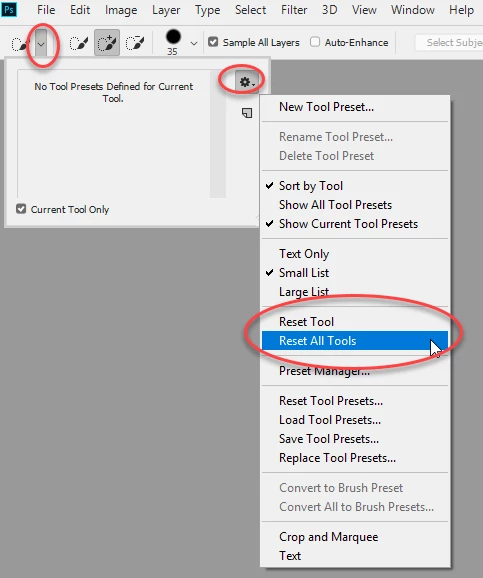
    if that does not work

    b. Reset Preferences . Go to Preferences >General >Reset Preferences on Quit and then close and restart Photoshop

    Dave

    12 replies

    Participant
    March 19, 2018

    I had the same issue, and then I clicked the button on the top-right "reset select and mask", it worked.

    Legend
    February 24, 2018

    Thanks, it certainly confused me! Sorry burkhardk.

    Legend
    February 24, 2018

    The request was: Can you go to Help > System info  (Photoshop Help menu) click on Copy and paste the info here. It may help us see what is happening in your system

    davescm
    Community Expert
    Community Expert
    February 24, 2018

    There appears to be some confusion creeping into this thread.

    burkhardk18767876 was the original poster and his issue appears to have been resolved with a Preference reset.

    herasymcuk joined the thread and his issue appears to not have been resolved by the same action and he was therefore asked to supply the system info. Until we see that info, we can do little to help.

    Dave

    Legend
    February 24, 2018

    Please send the system info report As asked.

    burkhardk18767876
    Participating Frequently
    February 24, 2018

    I don't see what I am supposed to do. My installation is in English and I was not asked for the system info but I can do it if this is what I should. I am traveling at the moment so it will take a couple of days.

    PECourtejoie
    Community Expert
    Community Expert
    February 23, 2018

    Could the affected users try to install Photoshop in English?

    https://helpx.adobe.com/creative-cloud/help/change-install-language.html

    burkhardk18767876
    Participating Frequently
    February 23, 2018

    My system is just working fine.

    February 21, 2018

    I updated to the latest version 19.1.1 but the select subject menu is not present. But the camera raw works normally. I read some posts where peoples had problems with it after the update.

    burkhardk18767876
    Participating Frequently
    February 21, 2018

    I am not a pro but followed the instructions: Reset Preferences . Go to Preferences >General >Reset Preferences on Quit and then close and restart Photoshop

    And it worked.

    Burkhard

    February 23, 2018

    it doesn't work for me..... On the "selection" menù....the "subject" voice is missing....so it's not related on something to be restored....it's seems like during the upgrade something was not updated!

    Participant
    February 20, 2018

    Hey all,

    same issue here. It was working fine and I could see the "Select Subject" option from the menu as well as from toolbar. All of a sudden it disappeared from both places. Resetting preferences and toolbar didn't fix it.

    February 4, 2018

    look at my pic. I have not the select subject option. i tried to restore and reset everything.

    burkhardk18767876
    Participating Frequently
    February 5, 2018

    I did, but it is hard to read.

    davescm
    Community Expert
    davescmCommunity ExpertCorrect answer
    Community Expert
    February 5, 2018

    burkhardk18767876 See here to reset the toolbar, don't worry about the 2015 designation it still works the same  Tools missing from the toolbar Photoshop CC 2015

    herasymcuk  If you are not seeing the tool with 19.1 then try

    a. Resetting the tools

    if that does not work

    b. Reset Preferences . Go to Preferences >General >Reset Preferences on Quit and then close and restart Photoshop

    Dave

    February 3, 2018

    anyone can help us?

    davescm
    Community Expert
    Community Expert
    February 3, 2018

    OK - Since no-one is putting up screenshots this is what it should look like - and what we want to see in your screenshots:

    1. The Select menu

    2. Inside select and mask. Note the select subject button only appears with the quick select tool selected. It will dissappear if you switch to the other tools

    3. If the any tools are missing from the toolbar go to the three dots - then choose Edit toolbar settings and restore defaults

    You can also check your workspace as different workspaces alter the toolbar content

    Finally Select Subject requires Photoshop CC v 19.1 which you can check in Photoshop>Help>System Info and looks like this :

    Dave

    burkhardk18767876
    Participating Frequently
    February 3, 2018

    As I said before. I can select subject, but only when I go to select and mask I see the quick select tool etc.I try my screenshot again:

    January 31, 2018

    I have a similar problem/iussue. The new "select subject" option is not present nowhere. I cecked my version number after the update, ofc and its 19.1. But on select menu, on select/mask window or in any selection tool....the command "select subject" (as i saw i many review) is not present. What i have to do? Thank you)