Known Participant
June 25, 2018
Answered

Photoshop CC 2018. How to revert to CC 2017

  • June 25, 2018
  • 1 reply
  • 1110 views

Photoshop CC 2017 ran satisfactorily on my PC on Windows 7.(package 1 upgrade).

I have just upgraded to CC 2018 but Photoshop (and Bridge) only works when opening the first photo after a PC reboot. It then fails to open subsequent images.I get the error nessage 'could not complete your request because of a program error', Then I have to reboot the PC to open another image.:

Please advise:-

  • how can I correct this problem?
  • How can I replace CC 2018 with CC2017 in my Adobe Creatvie Cloud?
  • How can I talk to real Photoshop technian rather than going round and round in circles on the fault pages?
  • How can I revert to the satisfactory state operation a week or so ago before I clicked the automatic upgrade in the Adobe Creative Cloud window?

Please note that I am a user of Photoshop CC not a computer expert (coming up to age 79!!)

Please help.
    This topic has been closed for replies.
    Correct answer Brandon Loshe

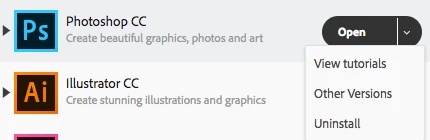
    I'll tackle a couple of your questions. You can go to the Adobe Creative Cloud manager. Where it says "Open," click the dropdown arrow to select "Other Versions."

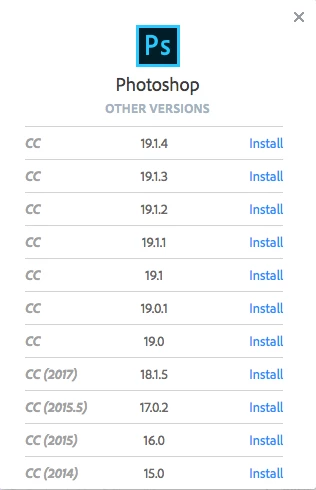
    Then select the version that you were on in 2017. From a quick glance, it looks like there is one option for CC 2017. But if you know the exact version, then you can select that one.

    By clicking "Install," this will install the older version over what your updated version is. Hope this helps with your troubles.

    1 reply

    Brandon Loshe
    Brandon LosheCorrect answer
    Legend
    June 26, 2018

    I'll tackle a couple of your questions. You can go to the Adobe Creative Cloud manager. Where it says "Open," click the dropdown arrow to select "Other Versions."

    Then select the version that you were on in 2017. From a quick glance, it looks like there is one option for CC 2017. But if you know the exact version, then you can select that one.

    By clicking "Install," this will install the older version over what your updated version is. Hope this helps with your troubles.

    Known Participant
    June 26, 2018

    Many thanks for your help. I have now downloaded CC 2017 but the problem still persists ie I often get the error message as previously indicated. I clearly need the Adobe experts to have a close look at my problem but I can't contact a real person.

    June 26, 2018

    Hi

    You can contact Adobe Customer Care from here

    Contact Customer Care

    Have you tried resetting Photoshop preferences