
Participant
September 20, 2018
Answered

Photoshop Cc 2018 - I cannot import images from my PC

  • September 20, 2018
  • 3 replies
  • 7184 views

I Just did the setup yesterday. Whenever I tried to import saved images from my PC to photoshop's desktop.  I mean each time I drag the picture to photoshop

it turns the image into a very tiny one that I have to delete it. The software was fine when I tried the Trial version. After I bought it yesterday I can't control it.

By the way, I am using windows 10.
    This topic has been closed for replies.
    Correct answer

    Hi

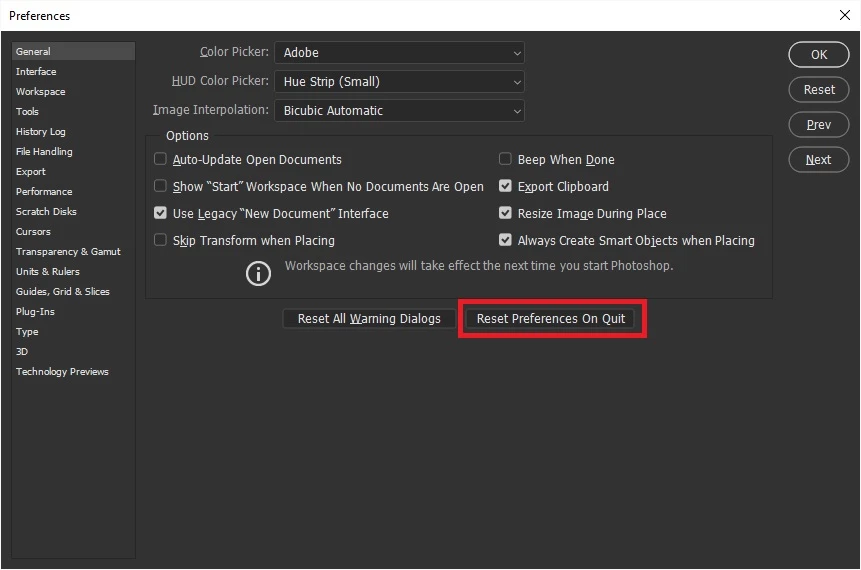
    Perhaps you could post a screenshot with all the pertinent panels opened, also have to tried resetting Photoshop preferences

    3 replies

    D Fosse
    Community Expert
    Community Expert
    September 20, 2018

    Don't drag, that's a bad habit. Many applications do unpredictable things with dragged files - like only picking up the thumbnail, not the full file.

    Use File > Open, or double-click from the file browser.

    KookiAuthor
    Participant
    September 20, 2018

    Thank you all for answering me. I will try all the mentioned instructions and let you know what happens.

    I also will send the screenshot showing the problem, if it was not fixed.

    Thanks again.

    It works. Problem solved.

    Thanks for the good advice. It was really helpful.

    Ussnorway7605025
    Legend
    September 20, 2018

    why are you dragging images into Photoshop?

    does the screen look small as well? very big images (like a camera takes in raw) will zoom out to save ram

    you can show these full size by pressing [ctrl] + [1]

    Correct answer
    September 20, 2018

    Hi

    Perhaps you could post a screenshot with all the pertinent panels opened, also have to tried resetting Photoshop preferences