
rosariag4127847
Participant
November 27, 2017
Answered

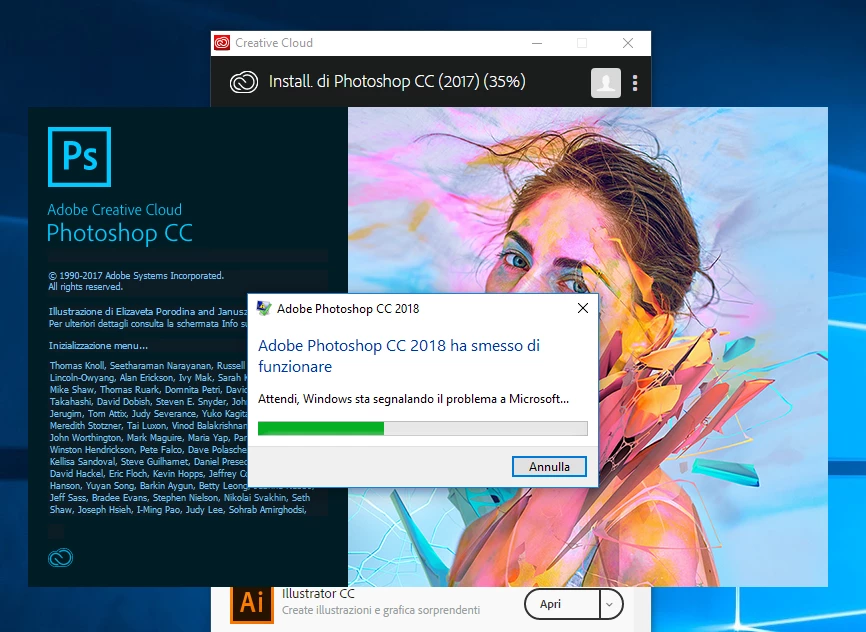
Photoshop CC 2018 Startup Crash

  • November 27, 2017
  • 3 replies
  • 3068 views

Hi,

i'm having problem with Photoshop CC 2018. I'de installed Illustrator CC 2018 and Premiere Pro 2018 and they run with no problem. Photoshop crash on startup while is loading menu on sartup session. My PC is ok, i've installed windows and drivers just before Adobe softwares.
My PC config is:
Windows 10 Home

Intel Core i5 7500
16GB Ram ddr4 2133
SSD 275GB Crucial MX300

AMD Radeon 460

Thanks for helping me.
This topic has been closed for replies.
Correct answer JJMack

It look like the Bridge and indesign are crashing in your Nvidia Device driver for you display adapter.  Go to their web site download and install the latest driver they have for your display adapter. Photoshop is trying to use a system service and its crashing most likely Photoshop is trying to display something so again your display driver is most likely where the problem is.

3 replies

GatunCZ
Participant
November 28, 2017

Photoshop crashes on startup:

Here is my fix.

I have three monitors, two on a video card, one on onboard video, all are DVI.

After disabling the onboard video (my third monitor) Photoshop started just fine.

Seems like Photoshop doesn't like having two video cards at the same time.

Fix idea came from this poster:

Photoshop CC 2017.1.1 Loading/Open Bug issue with AMD/IntelHD Multiscreen | Photoshop Family Customer Community

Participating Frequently
November 28, 2017

As JJMack said, it was a video driver problem. I've solved with Dell Certified drivers. Many thanks!

Driver Dell certificati per workstation Dell Precision | Dell ITALIA

JJMack
Community Expert
JJMackCommunity ExpertCorrect answer
Community Expert
November 27, 2017

It look like the Bridge and indesign are crashing in your Nvidia Device driver for you display adapter.  Go to their web site download and install the latest driver they have for your display adapter. Photoshop is trying to use a system service and its crashing most likely Photoshop is trying to display something so again your display driver is most likely where the problem is.

JJMack
Participating Frequently
November 27, 2017

Many many thanks, master JJMack! Have a nice day.

JJMack
Community Expert
Community Expert
November 27, 2017

There should be a crash report.   If you use Windows please use the Windows reliability history viewer find your Photoshop crashes and look at their details. Post them here.

JJMack
Participating Frequently
November 27, 2017

Hi JJMack. Thanks!

Firma del problema

Nome evento problema: APPCRASH

Nome applicazione: Photoshop.exe

Versione applicazione: 19.0.1.29687

Timestamp applicazione: 59fc1d5f

Nome modulo con errori: KERNELBASE.dll

Versione modulo con errori: 10.0.16299.15

Timestamp modulo con errori: 4736733c

Codice eccezione: c000041d

Offset eccezione: 0000000000013fb8

Versione SO: 10.0.16299.2.0.0.256.48

ID impostazioni locali: 1040

Informazioni aggiuntive 1: 1aec

Ulteriori informazioni 2: 1aecb0c2feca376fdf4f64078c490839

Ulteriori informazioni 3: 2752

Ulteriori informazioni 4: 27521e982474f7fc93c4256d7b5c3c8d

Ulteriori informazioni sul problema

ID bucket: 832bcd0469cc1d5a2958ed96dc1b3d8a (1826470881092386186)