

Photoshop CC 2019 Mac scale UI Font size
Help me understand something here.
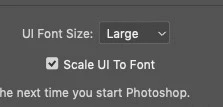
I can scale the UI fonts in PS to Tiny, Small, Medium and Large.
In CC 2019 Scale UI to Font was added.
Not sure what is meant or what is now supposed to happen that did not happen before. Now the entire UI will scale along with the fonts instead of just the fonts scaling within the UI?
Until my 4k display arrived, I was fine with Small, but now I'm looking to bump it up.
Ultimately I do not see much, if any, of a change in the UI size. Fonts or anything. I do see a difference between Tiny and any other, but not much.
I understand "mot much" is really subjective, but if I set Tiny it is too small... if I set it Small, Medium or Large it bumps slightly but, not enough to really matter. And I do not see any difference between them.
Illustrator does really nice here. Indesign you get nothing, but that is another issue. Is there something I am missing?
MacBook Pro Touch Bar, MacOS Mojave. Native resolution.
 AdChoices