
March 20, 2019
Answered

Photoshop CC 2019 - Transform change sucks...where is scale-to-point option?

  • March 20, 2019
  • 3 replies
  • 1231 views

Hi CC,

Don't get me wrong. I think Adobe is awesome, so much I am actually a shareholder. But what is this backwards shift / no-shift for scaling? Great way to make me left-handed all of a sudden when I have deadlines.

Furthermore, where is my scale-to-point option? Can I get this back? I can't use 2019 unless this is available. If somebody can help me find a preference to put this back to legacy and help me with my transform-to-point I'd be grateful.

Apple put reverse functions on their mouse control but the left OPTIONS.

Thank you for reading.
    This topic has been closed for replies.
    Correct answer Michael Bullo

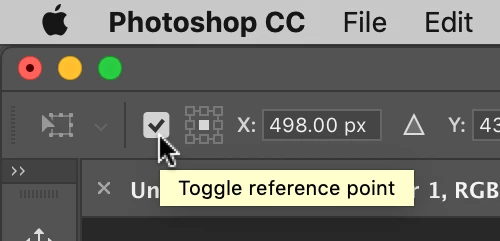
    Just in case you were unaware there is also a checkbox within the Options bar that will toggle the reference point on/off when in Free Transform.

    3 replies

    Participant
    October 16, 2019

    Also, try Preferences > General > check box "Use Legacy Free Transform"

    Michael Bullo
    Community Expert
    Michael BulloCommunity ExpertCorrect answer
    Community Expert
    March 20, 2019

    Just in case you were unaware there is also a checkbox within the Options bar that will toggle the reference point on/off when in Free Transform.

    March 20, 2019

    Ah, okay. Excellent! Photoshop doesn't suck anymore. Mine doesn't have that option the same way. There's no text indicating anything It's just a box. ?? I would never had any idea what that was for unless you showed me via screengrab. THANK YOU!

    I'm still wishing that Adobe would allow legacy use for this. I guess I'll get use to it. Just working in advertising I don't have time to get use to things on the fly. I'm guessing they have their reasons. I'm still going to use 2018 in the meantime, but that's really good to know they didn't abandon that target pin feature for transformation.

    Michael Bullo
    Community Expert
    Community Expert
    March 20, 2019

    Happy to help.

    Awesome username by the way

    Daniel E Lane
    Inspiring
    March 20, 2019

    Shareholder here as well. Love me some Adobe.

    So there still is scale to point. It's by the numbers. When you do the corner drag, it doesn't work. But when you use the numbers in the upper left, it works fine.